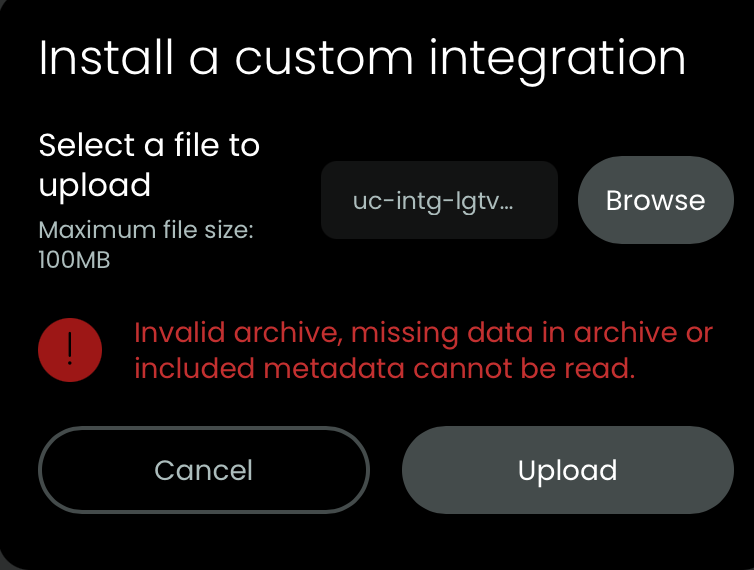
Hello,
I just received my remote 3 and I am having trouble integrating it.
Where do I start?
Hello,
I just received my remote 3 and I am having trouble integrating it.
Where do I start?
Get https://github.com/albaintor/integration-lgtv/releases/download/latest/uc-intg-lgtv-v1.8.0-aarch64-20250910_143305.tar.gz and check if the file you downloaded has the axtension .tar.gz because some browser expand files during download. In the web configuration, integration select add, custom on top right and upload this file. After installation click on this new integration and choose setup. Now enter IP of TV. TV must be active and you must watch it as you has to agree twice at the LG.
In case you also have other devices there are already quite some other integration listed here:
Ralf
Huge thank you Ralf 
Have a great weekend
I tried that TV is LG OLED . Error is Driver not connected. Failed to connect to host: Connection refused (is error 111). Any ideas? This is for Unfolded 3 which I just received
Just connected my LG OLED to my R3 a couple days ago using the GitHub. As noted above make sure the file downloads with the full “.tar.gz”. I couldn’t get the web configurator to allow me to select the file and I was getting frustrated until I realized my Mac kept cutting of the “.gz” portion of the file. Once I downloaded the LG GitHub file in full it was recognized and uploaded smoothly. You also need to make sure you connect your tv to WiFi or Ethernet if it isn’t connected.
Have you manaully cancled the setup or did it fail before? Then you need to remove the integration and upload it again. This is a known issue.
i removed and added back over 3 times
It does not turn tv on.
Note that my Denon Avr works
So you were able to complete the setup? Is the TV connected via Ethernet or WiFi? WiFi is known to cause problems with turning on the TV from nework sleep. Also make sure to check all Pre-requisites: GitHub - albaintor/integration-lgtv: Unfolded Circle Remote Two integration driver for LG TVs
No I was’t. TV was on ethernet. I added WiFi. No good
Then please post the integration and core logs after the error appears
After some changes the remote 3 does not actually affect any of the items. Not the LG OLED TV, nor the Denon AVR.
I add the bt configuration item for the Apple TV
As @kennymc.c said you need to post the integration and core logs after the errors appear if you want this community to help you diagnose your issue.
I don’t see any errors. I will see about dumping the logs. Thanks
I have saved them. How do I upload them?
I searched the web to try and find how to post the logs I have saved. No luck so far
So I keep trying. On the remote it says for pretty much everything: either “unknown” or “Error”
I have tried to access this URL but it returns not found
It was old. Current versions here:
Ralf
Thanks for that. When I try to download this file it always cuts off the .gz. I can’t add the .gz by editing the filename can I, because when I do it uploads OK then when I upload it into the web configurator it comes up with errors. Please advise. Thank you!
What OS are you using? Mac? Windows? iOS/iPADOS?
MAC Tahoe 26.1