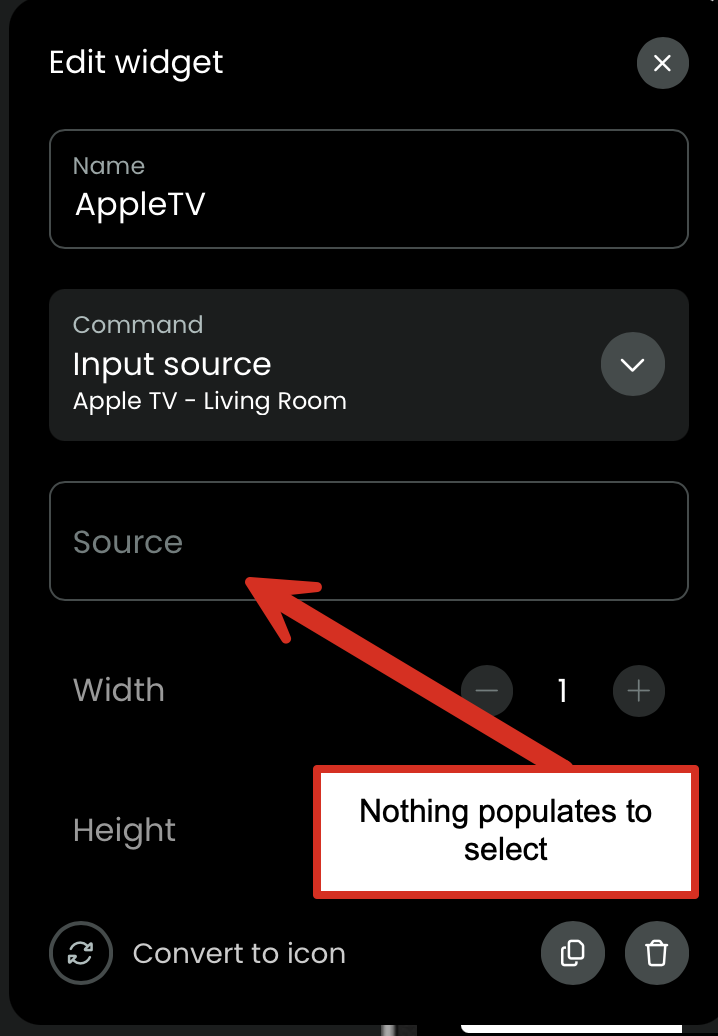
Is there a trick / easy way to get the Source List for Apple TV to populate? The source list is the list of Applications that are installed on the Apple TV.
The first two buttons that I programed populated the list and work fine, but when I went back to add more, the list no longer populates itself. Any ideas?
Loading the source list from the Apple TV seems to work fine according to the log as well as the sounds modes. But the sound mode list wich contains the audio output devices seems to be very long and contains a lot of duplicates. Perhaps the size is preventing the configurator from loading other lists correctly. Does the sound mode dropdown work? Can you try to remove the Apple TV entity from configured entities and add it again? This won’t affect your activites and maybe clears some internal caches.
This may not be a problem but when I had strange behaviours from the ATV integration it was down to the fact that each time you configure the ATV integration when setting it up it created new entries for both the remote and the companion in the ATV remote settings on the ATV itself. This then resulted in many duplicate entries which ultimately appeared in the logs. Once I removed all entries on the ATV and then reconfigured the ATV integration once more in the web configurator all of the strange behaviours went away. As I say this may not be your issue but worth checking you dont have these duplications anyway as they certainly wont help!
Same here, and not a solution, but I was able to type in a couple of the Apps that worked, i.e. “Disney+” and “Netflix”, but I could not yet find nomenclature for Amazon Prime Video. Better than nothing until this can be resolved. I am on the 2.8 beta.
I’m having the same issue with not being able to add the app launch buttons for my Apple TV. I tried deleting my Apple TV from the Entities and re-adding it without any success. The Apple TV activity works as it should, I would just like to be able to add the app buttons to the remote.
It’s also a command with a dropdown/text field. Just search for it in the commands list.
I noticed that I have the same problem now and restart didn’t help. I noticed that the App Store is shown as App\xa0Store in the log which might be causing problems when parsing the app list. Maybe this changed with one of the last tvOS updates.
Seems like the only “fix” for now is manually typing out the Source. I think this might only work on the Beta version of the software, though. (I don’t think it worked on the 2.6 version).
The apps don’t show up for me when manually searching for them in the command line for my Apple TV. I can see apps under my LG tv OS when searching only. I’m on software 2.8.1.
It now works again without doing anything in between like restarting the remote or the Apple TV. So it must be some kind of caching problem. On Discord other users had the same issue and also with other integrations like Denon