TheWolf
September 16, 2026, 10:09am
1
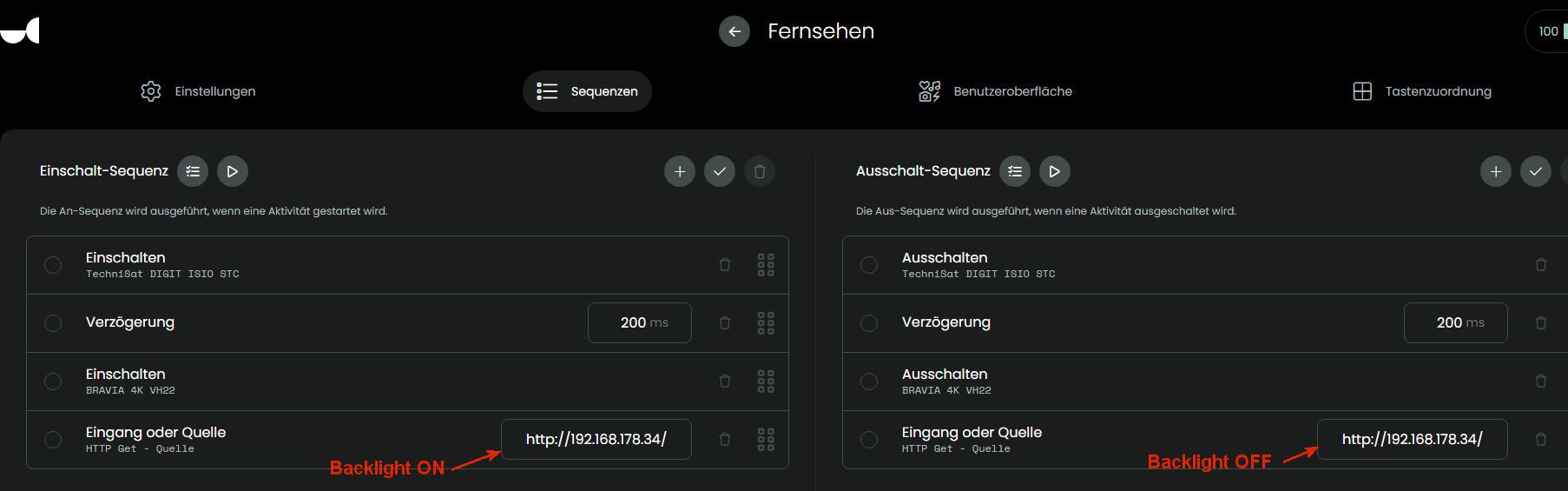
I use HTTP-Get to switch on/off my subwoofer via the LightManager.
If i switch from an activity with Subwoofer (e.g. listen radio) to an activity without subwoofer (e.g. watch tv) the http-command to switch off the subwoofer isn’t sent (subwoofer stays on).
More details (inkl. log-file) can be found on github:
opened 10:01AM - 16 Sep 26 UTC
bug
system
### Is there an existing issue for this?
- [x] I have searched the existing iss… ues
### Description
I use HTTP GET (HTTP requests, WoL & text via TCP) to turn my subwoofer on and off via the LightManager.
When I end the "Listen to Radio" activity, the HTTP command to turn off the subwoofer is sent.
BUT: If I switch from an activity that uses the subwoofer ("Listen to Radio") to one that does not ("Watch TV"), the HTTP command to turn off the subwoofer is not sent.
### How to Reproduce
Add an HTTP-Request into the Shutdown sequence and switch from that activity to another activity without such an HTTP-Request.
HTTP-Request is not executed.
### Expected behavior
Changing activities should execute the HTTP command too.
### System version
2.11.0
### What part of the system affected by the problem?
Overall system
### Additional context
LOG:
https://www.dropbox.com/scl/fi/bsnflrrgl43suwkhsih4t/UCR3_logs_2026-09-16.txt?rlkey=z9k50qsqhlxe91hf7b5mgmrfw&st=hghy3f0x&dl=0
<img width="1871" height="434" alt="Image" src="https://github.com/user-attachments/assets/6d8f5596-fe36-4374-bef2-985373748d42" />
<img width="1806" height="565" alt="Image" src="https://github.com/user-attachments/assets/3f344a8a-d2b7-4be5-aa74-7a6e74a49da8" />
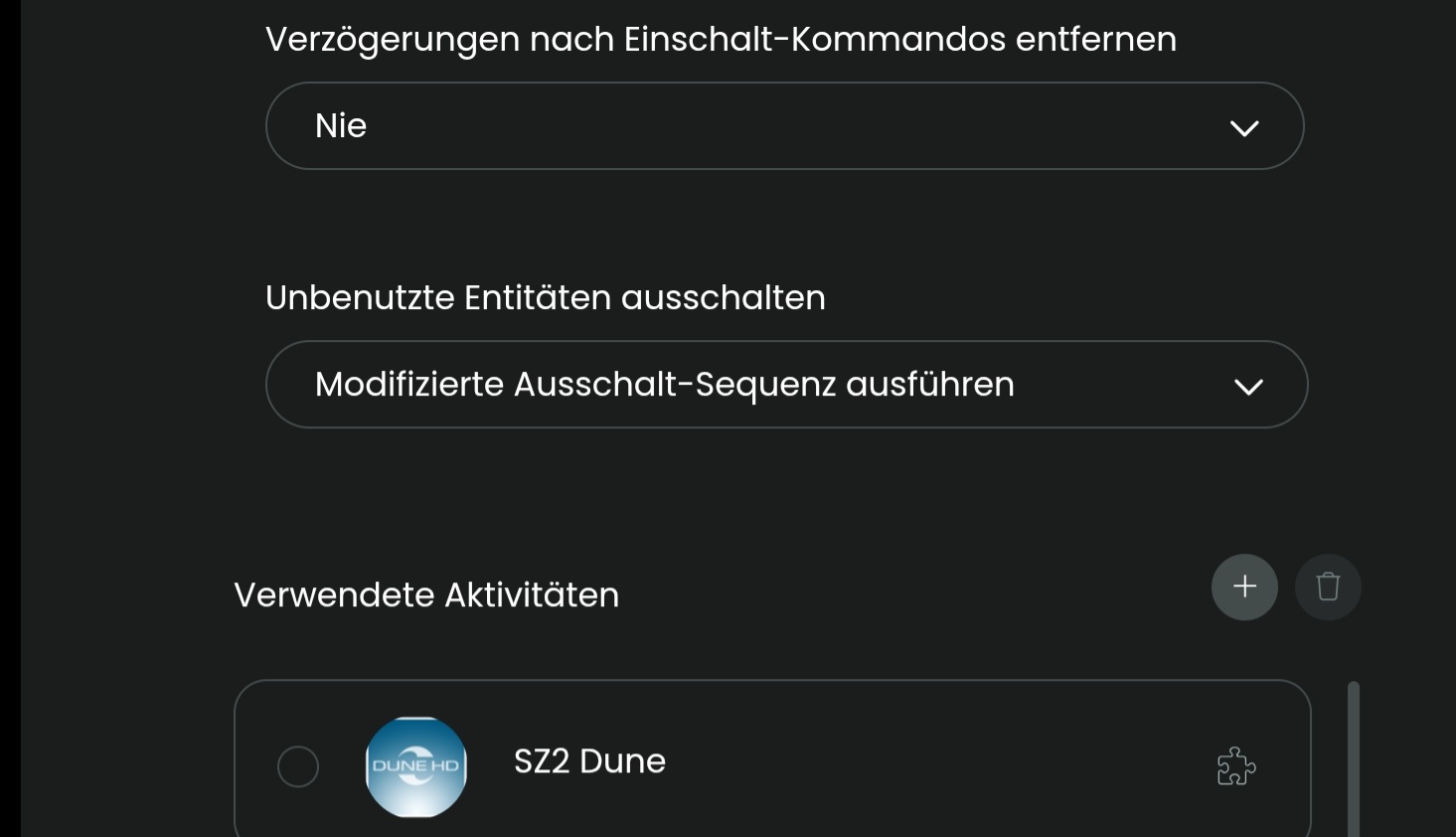
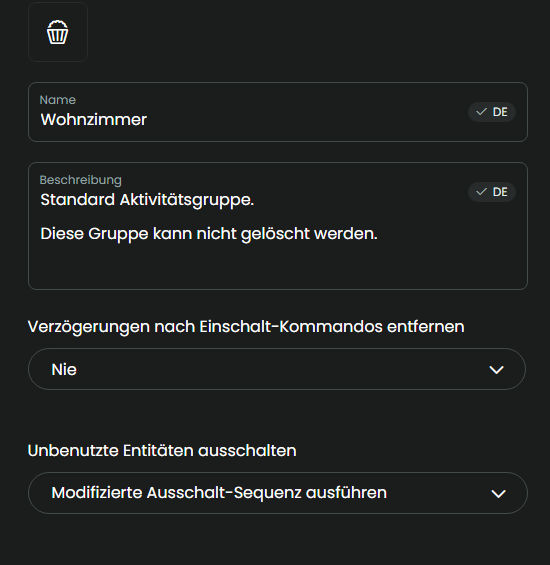
In the activity group configure use modified end sequence.
Ralf
As already mentioned in the ticket you should use custom entities
TheWolf
September 16, 2026, 2:04pm
4
Sorry, but what is
“… modified end sequence” and
“… custom entitie”?
To make it clear. My usage hasn’t to do with any power-state. Each HTTP-Request sends an command to the LightManger which then executes an RF-Plug. It works correct if an activity is ended but not if is switched to another activity.
The same problem exists with Android TV, which doesn’t switch off when the activities changes. Unfolded support has confirmed this as an bug.
Modified end sequence in activity group means that all commands in end sequence are executed with the exception of power off for entities that are used in the new activity.
It is a setting in activity group
Because in your example it is really a switch on/off case. What happens if you switch from one activity with sub to another with sub? Here a custom entity with the request integration would be more save. You can create an entity with several http command which behaves like other entities with real switch on/off.
Ralf
TheWolf
September 16, 2026, 2:57pm
6
The sub stays on because the HTTP-Request inside the shutdown sequence isn’t executet.
Ok maybe you’re right but -sorry- i don’t know how to do that.
I meant if the http command would be executed. The sub would be powered off and then on again. Custom entity is the only way to make it consistent. It is easier than it sounds:
A network multi tool integration for Unfolded Circle remote devices
Example from my system Epson tw7300:
epson_tw7300:
Features:
'Off':

  Type: tcp-text

  Parameter:

    address: 192.168.178.66:4352

    text: "%1POWR 0\\r"

'On':

  Type: tcp-text

  Parameter:

    address: 192.168.178.66:4352

    text: "%1POWR 1\\r"
Simple Commands:
HDMI1:

  Type: tcp-text

  Parameter:

    address: 192.168.178.66:4352

    text: "%1INPT 31\\r"

HDMI2:

  Type: tcp-text

  Parameter:

    address: 192.168.178.66:4352

    text: "%1INPT 32\\r"
The real interesting part is feature on/off.
Ralf
You can take the example configuration and modify it just a bit and adjust the url:
Subwoofer:
  Features:
    'Off':
      Type: get
      Parameter: https://192.168.178.34/control?cmd=xxx
    'On':
      Type: get
      Parameter: https://192.168.178.34/control?cmd=xxx
TheWolf
September 17, 2026, 8:28am
9
Hi.
I created a new entity and added it into the activity.
After adding the commands into the sequences everything runs as expected.
No need/possibility to add it into the activity group.
Thanks thousand times for your support.
If you created a new Subwoofer entity with the request integration it is a normal entity which can be added like any other entity to an activity.
The setting I mentioned is valid for all activities in that group. In configuration of activity the group it belongs to can be configured.
Ralf
TheWolf
September 17, 2026, 9:20am
11
Now there’s another “I don’t know why”:
I use two separate commands to switch on and off my TV’s backlight. (Handling like the subwoofer).
But … if i change the activity from one “with backlight” to another “without backlight”, backlight is switched off correctely.
Why? I thought backlight would work the same (wrong) way like subwoofer did before changing. Now i’m really confused.
Did you configure modified end sequence for the group?
Ralf
That is the answer. Now all commands in end sequence are executed with exception of power off of still needed devices.
But now you should have a little problem if you switch from activity with backlight to activity also with backlight.
Ralf
Perhaps to fast to be noticed.
TheWolf
September 17, 2026, 10:18am
17
Maybe.
I’ll try an own entry for backlight (like that for subwoofer).
TheWolf
September 17, 2026, 12:10pm
18
Question:
What to do, if i use two devices? Im my case “Subwoffer” and “Backlight”.
Must i create two separate entities?
As we said it is the best option for on and off as this will be correctly handled by the R2/R3.
Just add the second entity to the configuration. This will result in an additional entity.