I’ve had my R3 and D3 for a couple of weeks now and have been using it as my daily remote. For the most part it works great. As mentioned by a lot of other folks, the battery life is really not that great, but so far I have not run out of battery and I do put it in the dock to charge after each use.
Sometimes putting the remote into the dock does not charge the remote. I get an indication on the dock display that it is not charging and I get (what I assume) is the current power consumption of the dock in milliamps (something like 10450 ma). A power cycle of the dock seems to fix that issue and then the remote charges without any issues. I haven’t figured out a pattern to this situation yet, it seems to be pretty random. It’s happened to me about 3 times so far in the last week and a half. I am using a 3.0A 5V USB-C power brick (so that should meet the 12.5 watt requirement of the dock/remote).
Also, sometimes the remote will just stop controlling things (also kind of randomly). Not sure if it’s maybe lost it’s network connectivity? I just assigned both the D3 and R3 static IP addresses this morning on my DHCP server, so the next time the remote gets in that state I am going to try and ping the remote to see if it’s still connected to the network.
I’m hoping these are software issues (I’m currently running the latest versions available for both). Not really a show stopper, but just really annoying!
hey Cliff. Not sure whats going on with your dock. In terms of your connection challenges - do you have keep wifi connected in standby enabled? Also are you preventing sleep during your activities? This does drain the battery more but provides for instant response. Others who have had wifi challenges have also recommended forcing the remote to the 2.4GHz band as well as assigning a static IP (which you have done). Some even run it on its own SSID.
Thanks. Yes, I have keep wifi connected in standby and prevent sleep turned on. The dock is connected via an ethernet cable (since it’s right next to my switch I figured I wouldn’t deal with any wifi issues)! The wifi setting on the remote is currently set to auto, so I might try changing that to force the 2.4 ghz network the next time it happens to the remote. The dock is the really strange issue…it has power, is booted and connected to the ethernet, it just will not charge the remote until it has been power cycled (not sure what the power being displayed in milliamps is trying to tell me).
Just one point of clarification on the dock. You say its connected to ethernet so I assume thats not PoE as you also have it connected to a power brick? PoE and USB power should not be connected at the same time. For what its worth on the wifi side I have found that having the active scanning set on and set to around 12s has helped to stabilise my connection.
Correct. The ethernet connection is not power over ethernet…the only power source is the USB-C power connection. I will try turning on the active scanning and set my interval to 12s as well! Thank.
O.K. It has happed to me a few more times. It seems to be when the remote is placed back in the dock after having been out for a while (but not every time). The dock is still being seen on the network (it is pingable) and it is still sending IR codes but it will just not charge. Here is a photo of what I see on the docks display. It seems like the dock has gone to sleep and is just waking up when I put the remote back into the cradle. It runs through all of the initialization displays (like when it’s first powered on) and then stops at that “CHG OFF” display when I put the remote in the cradle to charge. The only way to solve this issue is with a power reset of the dock and then everything is fine., Assuming this is just some type of software bug?
Sometimes it’s higher than that and sometimes it’s lower than that. It also seems that when it does it the dock goes through it’s full boot cycle. Not sure if the simple act of placing the remote in the dock is causing the reboot? Most of the time when I put the remote into the dock it immediately gives me the charging chime and starts charging. Every once in a while it goes through (what looks like anyway) a full boot up cycle on the display. Most of the time even when it does that, it starts charging OK, but once in a while it fails to charge and I get that on the display. A power cycle (with the remote out of the dock of course) fixes that issue every time. I bought myself a wireless charging dock and usually now charge the remote on that (although I have to do that upside down because of the location of the charging pad on the remote)! Not really a show stopper…just wondering if somehow (and fairly rarely & randomly) putting the remote in the dock is causing a reboot and charge failure?
The adjustment to the over-current protection for the Unfolded Circle Dock 3 was included in Firmware Release 0.8.0, which increased the overcurrent limitation to 2000mA.
Unless I missed it, you didn’t mention if you’ve tried a different (reputable) charger and are using the supplied cable? I’d definitely try that. If you’re still experiencing the issue, I’d say, your dock is defective (welcome to the club!)
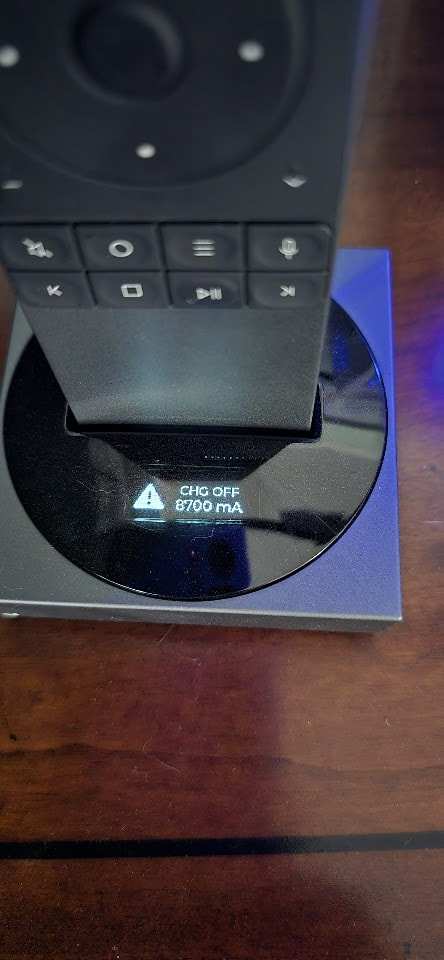
 ) but, from what I’ve read I think what you’re experiencing is the over-current protection that was added to the dock firmware a few months ago.