Every few minutes my remote disconnects the bluetooth connection to my firestick, then re-connects. It puts a notification on the screen when doing this. I don’t know if it’s the remote or the firestick causing this. Does anyone else have this problem or know how to either 1) Stop it happening at all, or 2) supress the on-screen notifications? Thanks.
This behavior is default but can be changed with the REST-API
that’s great thanks, is there some instructions somewhere explaining how you install/configure the REST-API please?
If you enter the IP of your remote you are asked for the pin and below this you see a link directly to the API. The nice thing is that you can use the API directly from there.
Ralf
1 Like
Thanks for that, I have managed to find the section reelvant to the bluetooth config. But I’m not sure how to enter the parameters/code into that. Or do I need to use a different tool to actually make changes?
Hi,
goto to /api/cfg/bt in the REST-API. I then open a 2nd tab in the browser and log into the remote so that I have the rights to change something. Then press “Try out” then you should see
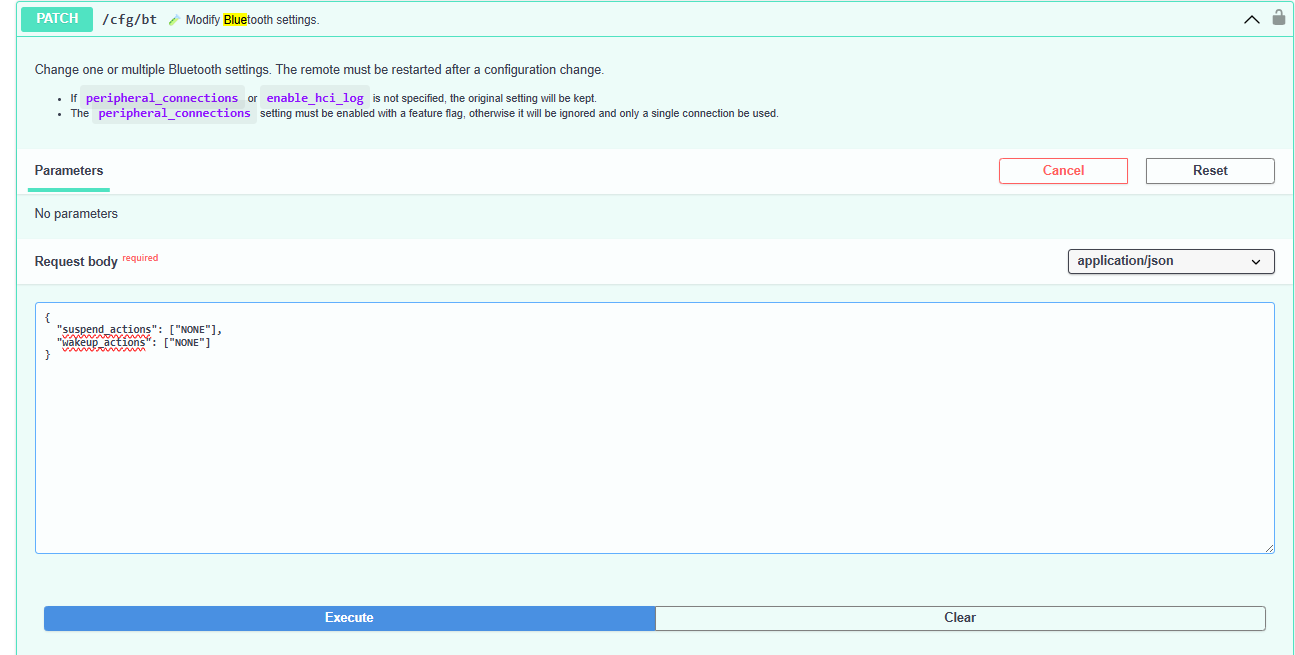
Enter the string as in this picture or written in link I posted before and press execute.
The response should be
{
“peripheral_connections”: 5,
“advertisement_name”: “Remote3 000000”,
“enable_hci_log”: false,
“enable_debug_port”: false,
“version”: “0.6.0”,
“suspend_actions”: [
“NONE”
],
“wakeup_actions”: [
“NONE”
]
}
1 Like
Thank you so much for your help! I clicked Execute and got the result you posted. I then rebooted the remote but the same behaviour happened. I also opened the API again but the change I made was no longer there. Should I be doing something else after clicking execute to save this API change?
It says:
Change one or multiple Bluetooth settings. The remote must be restarted after a configuration change.
- If
peripheral_connectionsorenable_hci_logis not specified, the original setting will be kept.
Do I need to do something for this setting to be kept?
Not that I know of. I have 5 BLE devices activated because I already use 4 (3*FireTV and one Dune 8K).
Ralf
Cool, and you don’t get the popup on the screenm for disconnect and reconnect of the remote?
No I don’t get some kind of connect/disconnect. I know what you mean I found it annoying in 2024.
Ralf
When I put the code in and execute, reset my remote, the popups still continue. It’s driving me mad! I can’t see the changes in the API, am I supposed to be able to see the code changes when I use the GET part of the API?
Hi,
when I put
{
  "suspend_actions": ["NONE"],
  "wakeup_actions": ["NONE"]
}
in the text field I get the following result:
{
  "peripheral_connections": 5,
  "advertisement_name": "Remote3 000000",
  "enable_hci_log": false,
  "enable_debug_port": false,
  "version": "0.6.0",
  "suspend_actions": [
    "NONE"
  ],
  "wakeup_actions": [
    "NONE"
  ]
}
with get I also get
{
“peripheral_connections”: 5,
“advertisement_name”: “Remote3 000000”,
“enable_hci_log”: false,
“enable_debug_port”: false,
“version”: “0.6.0”,
“suspend_actions”: [
“NONE”
],
“wakeup_actions”: [
“NONE”
]
}
Ralf
Should I then restart my remote, or does restarting erase the change?
I restarded my remote and both BlueTooth settings are still “NONE”.
Ralf
Mine are gone after restart, so there must be something else I need to do in order to keep them?
You wrote that you reset your remote after you executed the command. That will of course reset all settings on the remote. Or did you meant restart?
Sorry, I mean I reboot it.
Yesterday i had problems with sending commands via BlueTooth to the stick (got error-message on each command)
On Discord i got the tip to restart the Stick (unplug power, wait about 10 seconds, plug power again).
After that my problems are gone and the bluetooth-connection to ther remote 3 still is active.
Maybe restarting the stick could solve this problem too?
I had this issue with the BT notification as well. There is a pretty simple solution. Switch it off in the settings of the FireTV stick.
My FireTV stick is in German so I try to translate the menu path. Go to “settings /notifications /options /settings /app-notificatins”. There are now the different system settings. (green Android logo in front) 1. FireTV notices, 2. FireTV parental controls and 3. FireTV settings.
I cannot say which one of these 3 is the right one, because I have deactivated them all, but I assume it’s the 3rd. Try it.