Ziggo Mediabox Next

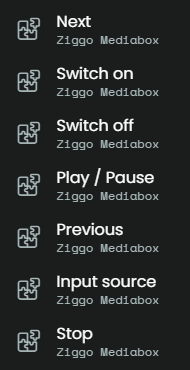
So… Home Assistant (Green) is up and running. And with a bit of puzzling I integrated the Ziggo Mediabox Next to Home Assistant. After that the Remote 3 found the mediabox! But… a new problem arose. While button mapping, I discovered only a few functions of the Ziggo Mediabox Next are to be found:

I’m sure I can get the other buttons active in Home Assistant (and by doing so, these will be available at the Remote 3), but my question is: how to do so in Home Assistant?

Can anybody give me a step-by-step explanation of how to get the other functions available? All help is much appreciated!!

1 Like

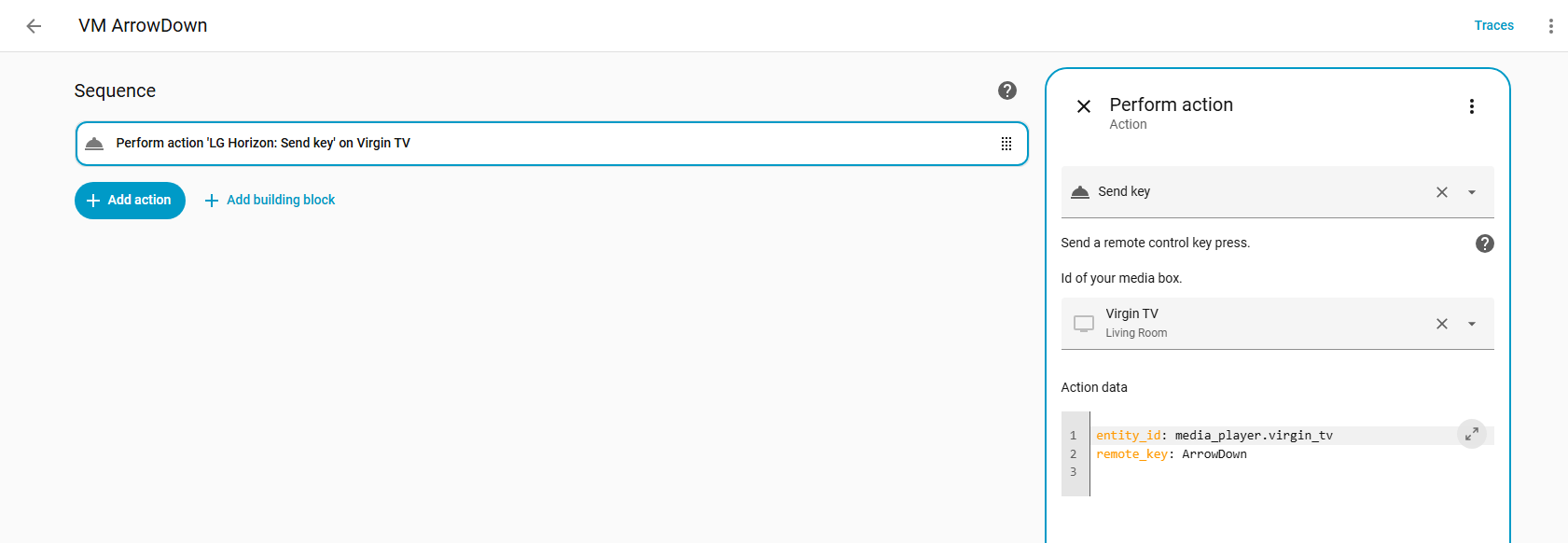
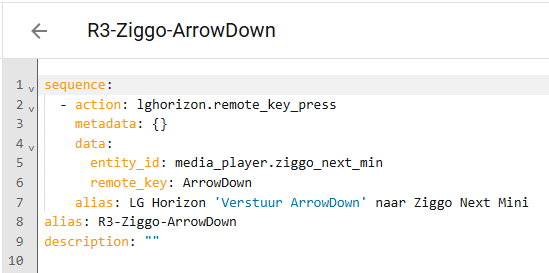
You add them as individual “send remote key” scripts in Home Assistant. For example here is a script for ArrowDown

The names of the keys are listed here on the picture of the remote: Sholofly/lghorizon: Custom integration to control LG Horizon settop boxes for Ziggo(NL), Magenta(AT), UPC(CH), Virgin(GB, IE), Telenet(BE)

I had the same problem with the integration for the Ziggo Next Mini.

You need to add every button for the R3 to the Ziggo integration in Home Assistant.

  1. select Setup

  2. select Automation and scenes

  3. select Scripts

  4. select Add Script

  5. select New Script

  6. select Add Action

  7. select Other Actions

  8. select Run Action

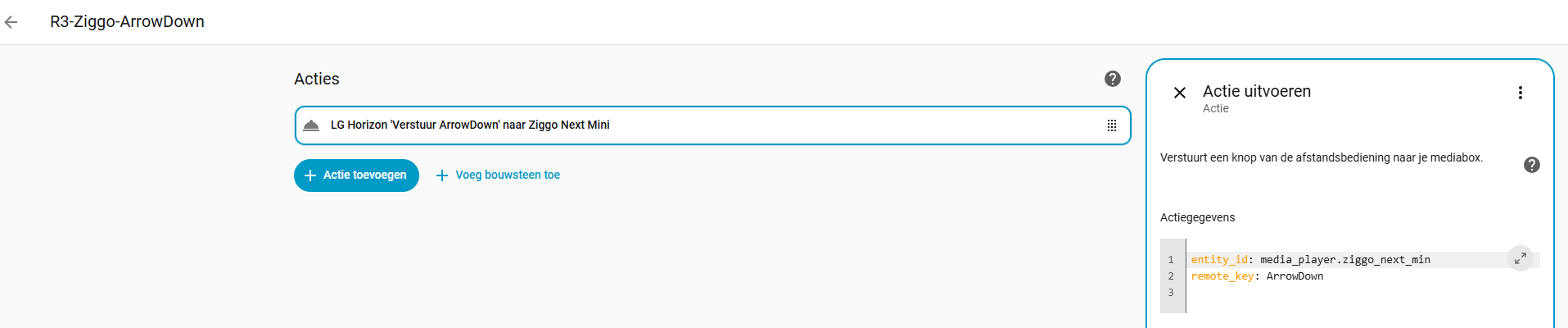
  9. select Send Button of the Ziggo integration (for example)
    entity_id: media_player.ziggo_next_min
    remote_key: ArrowDown


  10. Name the Script R3-Ziggo-ArrowDown
    Do step 4 til 10 for all buttons

  11. select Integrations under Devices and Services

  12. select the Unfolded Circle integration

  13. click on the cogwheel

  14. select share entities with Remote 3

  15. select all your scripts, make sure the tickbox “Automatically configure entities shared with Remote” is ticked. and press submit.

Now you need in the Web Configurator to add all these Scripts as Entities (for example R3-Ziggo-ArrowDown) in the Home Assistant integration.

1 Like

Thanks! :+1:

Hi all. So… I made the scripts in Home Assistant as instructed. Secondly, I added these scripts to the Remote 3 Web Configurator as entities, which I than added to an activity (in my case: “watch TV“). After that I did some button mapping by assigning these scripts/entities to specific buttons.

But… when testing, nothing happend. The Ziggo Mediabox Next doesn’t react to none of the assigned buttons. Only during the on/off sequence the mediabox starts up/shuts down. Any clues?

To give some background info:

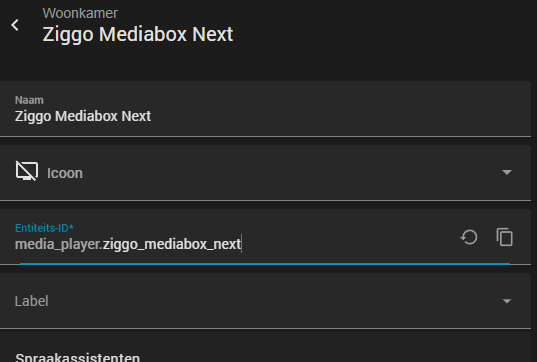
In Home Assistant the entity’s name of the Ziggo Mediabox Next is:

media_player.ziggo_mediabox_next

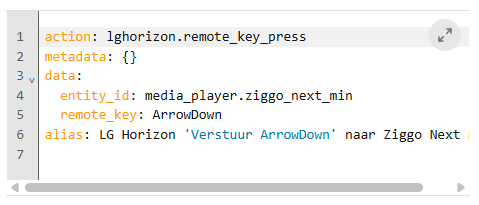
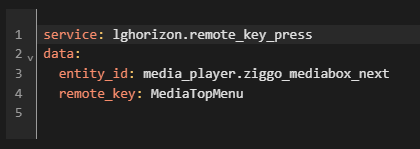
One of the scripts I wrote is:

Note: @Aruit wrote ‘action‘ but I also saw an example in which they used ‘service‘ instead. Both options don’t give a working result.

Stealthman, I have edited my step-by-step plan (above) and add an extra picture.

See also Home Assistant LG Horizon integration for Ziggo Next Mini

Hopefully this will help you, otherwise contact me.

I have the remote codes.

“manufacturer”,“device”,“key”,“format”,“code”
“Custom - learned IR codes”,“Ziggo Next”,“Power”,“HEX”,“21;0x20C0260C;32;0”
“Custom - learned IR codes”,“Ziggo Next”,“1”,“HEX”,“21;0x20C02601;32;0”
“Custom - learned IR codes”,“Ziggo Next”,“2”,“HEX”,“21;0x20C0A602;32;0”
“Custom - learned IR codes”,“Ziggo Next”,“3”,“HEX”,“21;0x20C0A603;32;0”
“Custom - learned IR codes”,“Ziggo Next”,“4”,“HEX”,“21;0x20C02604;32;0”
“Custom - learned IR codes”,“Ziggo Next”,“5”,“HEX”,“21;0x20C0A605;32;0”
“Custom - learned IR codes”,“Ziggo Next”,“6”,“HEX”,“21;0x20C02606;32;0”
“Custom - learned IR codes”,“Ziggo Next”,“7”,“HEX”,“21;0x20C02607;32;0”
“Custom - learned IR codes”,“Ziggo Next”,“8”,“HEX”,“21;0x20C0A608;32;0”
“Custom - learned IR codes”,“Ziggo Next”,“9”,“HEX”,“21;0x20C02609;32;0”
“Custom - learned IR codes”,“Ziggo Next”,“0”,“HEX”,“21;0x20C0A600;32;0”
“Custom - learned IR codes”,“Ziggo Next”,“Mute”,“HEX”,“21;0x20C0260D;32;0”
“Custom - learned IR codes”,“Ziggo Next”,“Stop”,“HEX”,“21;0x20C02631;32;0”
“Custom - learned IR codes”,“Ziggo Next”,“Rewind”,“HEX”,“21;0x20C0A629;32;0”
“Custom - learned IR codes”,“Ziggo Next”,“Play”,“HEX”,“21;0x20C0A630;32;0”
“Custom - learned IR codes”,“Ziggo Next”,“Forward”,“HEX”,“21;0x20C02628;32;0”
“Custom - learned IR codes”,“Ziggo Next”,“Up”,“HEX”,“21;0x20C0A658;32;0”
“Custom - learned IR codes”,“Ziggo Next”,“Down”,“HEX”,“21;0x20C02659;32;0”
“Custom - learned IR codes”,“Ziggo Next”,“Left”,“HEX”,“21;0x20C0A65A;32;0”
“Custom - learned IR codes”,“Ziggo Next”,“Right”,“HEX”,“21;0x20C0265B;32;0”
“Custom - learned IR codes”,“Ziggo Next”,“Ok”,“HEX”,“21;0x20C0A65C;32;0”
“Custom - learned IR codes”,“Ziggo Next”,“Menu”,“HEX”,“21;0x20C026DB;32;0”
“Custom - learned IR codes”,“Ziggo Next”,“Guide”,“HEX”,“21;0x20C026CC;32;0”
“Custom - learned IR codes”,“Ziggo Next”,“Back”,“HEX”,“21;0x20C0A65C;32;0”
“Custom - learned IR codes”,“Ziggo Next”,“Chanel+”,“HEX”,“21;0x20C0A620;32;0”
“Custom - learned IR codes”,“Ziggo Next”,“Chanel-”,“HEX”,“21;0x20C0A621;32;0”
“Custom - learned IR codes”,“Ziggo Next”,“Info”,“HEX”,“21;0x20C026CB;32;0”
“Custom - learned IR codes”,“Ziggo Next”,“Help”,“HEX”,“21;0x20C02681;32;0”
“Custom - learned IR codes”,“Ziggo Next”,“OnDemand”,“HEX”,“21;0x20C026F5;32;0”
“Custom - learned IR codes”,“Ziggo Next”,“Recordings”,“HEX”,“21;0x20C02649;32;0”
“Custom - learned IR codes”,“Ziggo Next”,“Teletext”,“HEX”,“21;0x20C0263C;32;0”
“Custom - learned IR codes”,“Ziggo Next”,“Red”,“HEX”,“21;0x20C0266D;32;0”
“Custom - learned IR codes”,“Ziggo Next”,“Green”,“HEX”,“21;0x20C0266E;32;0”
“Custom - learned IR codes”,“Ziggo Next”,“Yellow”,“HEX”,“21;0x20C0266F;32;0”
“Custom - learned IR codes”,“Ziggo Next”,“Blue”,“HEX”,“21;0x20C02670;32;0”
“Custom - learned IR codes”,“Ziggo Next”,“Switch”,“HEX”,“21;0x20C026F2;32;0”