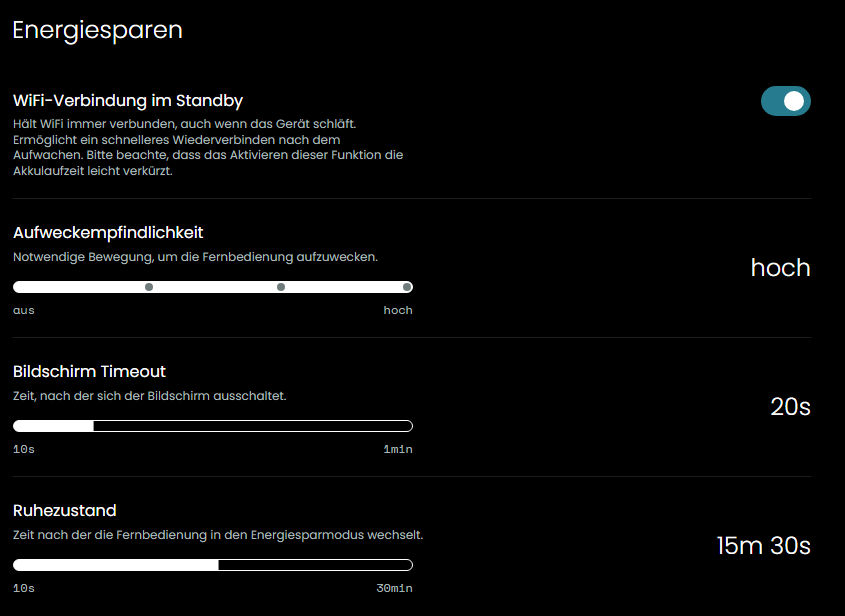
After updating to version 2.12.1, I switched the Wi-Fi setting to “Power Saving” mode.
initial situation: An activity is running correct. After some time i want i.e. increase volume on AVR or speedup replay on STB. If WLAN wakeup is necessary at that time the errors appear.
Settings:
Power Settings → see picture “Energiesparen”
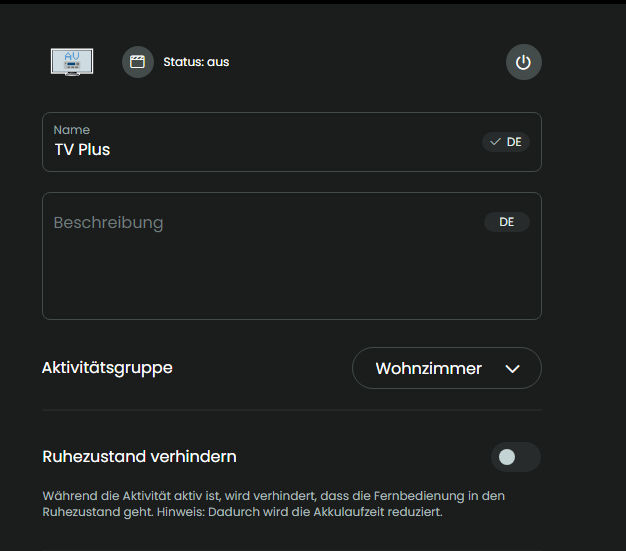
Activity Settings → see picture “Activity”
The problem:
After the Remote 3 wakes up, some devices cannot be controlled.
TechniSat STB cannot be controlled (error message displayed on the screen)
It appears to begin here:
2026-11-07 19:21:33.182196 +00:00 core NOTICE [UCD3-0B6A04] IR emitter availability: false
2026-11-07 19:21:33.180720 +00:00 core NOTICE [UCD3-0B6A04] on_session_disconnected: ClientDisconnect
2026-11-07 19:21:33.178554 +00:00 core NOTICE [UCD3-0B6A04] Reconnecting in 451ms
2026-11-07 19:21:33.177598 +00:00 core NOTICE [UCD3-0B6A04] Disconnected
From this point on, the TechniSat can be controlled again.
2026-11-07 19:27:08.478457 +00:00 core NOTICE [UCD3-0B6A04] IR emitter availability: true
But only up to this point:
2026-11-07 21:29:47.887275 +00:00 core ERROR [UCD3-0B6A04] Error sending dock command ir_send: Connection to dock not established
2026-11-07 21:29:37.351406 +00:00 core NOTICE [UCD3-0B6A04] IR emitter availability: false
Denon AVR cannot be operated (error message on the display)
Some time later, an error message also appears when attempting to operate the Denon AVR.
2026-11-07 23:47:09.032703 +00:00 core NOTICE [uc_denon_driver] Reconnecting in 1.363s
2026-11-07 23:47:09.032467 +00:00 core NOTICE [uc_denon_driver] Error: WebSocket error: IO error: Connection refused (os error 111)
Complete log is here: Dropbox - WLAN-Wakeup-UCR3_logs_2026-11-08.txt - Simplify your life