Turning Windows-PC on with R3

I wanted to start an Intel NUC with Wondowd 11 inn an activity. I already installed the “HTCP System Monitor & Controls” but there is no command to start the PC, just to shutdown.

With my Harmony it works perfectly, but I don’t kno how to do it with the R3.

Thanks in advance for your help!

If Harmony works you almost certain have an IR receiver build in. Old Intel NUCs used a RC6 protocol from Windows MCE. You should be able to learn this IR command from your Harmony.

I configured my “Big” PC and my old Intel NUC with WOL and there are several integrations which can send a WOL perhaps the HTPC System monitor also. To get WOL working you must activate some things in the BIOS and driver settings of Windows.

Ralf

Have you tried FLIRC Remote?

What du you mean with FLIRC Remote?

FLIRC Remote is a programmable USB IR Transceiver which allows to turn a device (even bluetooth like the SHIELD) into a IR capable device. Its perfect for HTPC use.

For starting a PC remotely which is off, you also need to configure it through the BIOS. Then WOL/ use a magic packet to startup.

I did exactly that with Home Assistant.

Enable WOL in HA, then create a switch. Integrate HA into the R3. Then assign the HA switch in the R3 to an activity, for example.

will it be helpful if i try to capture the PC MAC address during setup flow and then add a power on WoL command button? if you got an example or such command which you know will work, will save me lots of time. Can definitely grab the MAC during setup flow. if its helpful for as an enhancement

I now tried this integration: GitHub - kennymc-c/ucr2-integration-requests: A network multi tool integration for Unfolded Circle remote devices

But it doesn’t work. I tried the ip-address (there I get an error at the remote while processing the activity) an the mac-address (no error, but still no starting of the pc).

WOL is activatied in BIOS!

Any ideas?

HA is the last step - I have absolutelty no experiences with that! :joy:

BIOS is perhaps not enought. The PC must shut down and enable WOL this ist done in the setting of the network driver of Windows.

Yes, that is enabled as well. Still not working :frowning:

In the source-field is only the mac-address to be filled? Or something else?

Almost all BIOS’ has a “boot at power on” setting.

I just enabled it, and then used a zigbee power outlet, and connected the pc to that. When i want to boot the pc - just turn the outlet on and badabom :slight_smile:

I am finishing a new Build for my HTPC integration:
Changelog:

  1. Add optional text feild during setup flow to add MAC address
  2. If user add MAC address, new button will be created called “PowerOn” which will send a magic packet WoL to power on the computer
  3. Bios and PC settings must be set to allow WoL
  4. New build that will provide a docker image for those who want to use Docker

Build should be ready in a few minutes for testing. Will post link soon.

WOW! Great, thanks so much. Will test tomorrow and give feedback!

its ready for testing. version 0.2.3 added more guidance in readme.md file as well:

Enjoy, hope it works.

Will this allow the pc to be turned on & off through ip, like other integrations?.Apologies if this seems a stupid question

Yes and No… I wrote a custom agent (.exe) that communicate via IP and its own dedicated port to act as the “translator” between the remote and the computer. So during integration you enter the PC IP and then it will have on and off among other things.

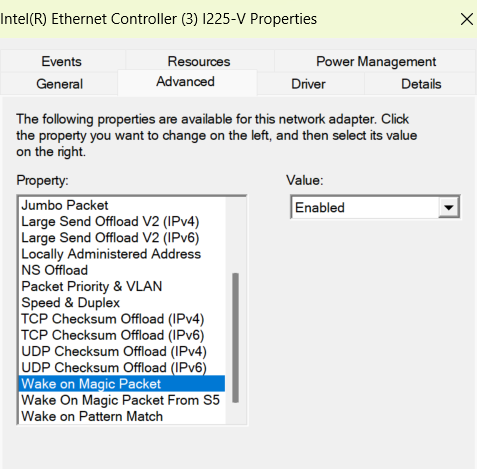
Works perfect now! Thanks very much!

Some tipps for others I struggled with:

  • Turn off “Turn on Fast Startup” in the systemcontrols - energy options

  • Put the htcp-agent.exe in the autostart-folder

Nice! Glad it works :slight_smile: