Hello. I’m having trouble adjusting the volume on my Denon AVC-X3800H. The volume control is working very poorly. 1. My first attempt was to program the IR codes from the original remote. I programmed both a single tap and a long press (I checked, and there are different codes for single press and long press, although they’re almost identical). Unfortunately, only the single press worked. Holding the button also caused a single volume movement. 2. I tried integrating the Denon via IP. This was a little better, but still not working. The single press works fine, but holding the button has a significant delay. Initially, I noticed it worked with a 2-second delay, but I found an option that allowed me to adjust it. Unfortunately, the minimum delay is 250ms. Even after setting this delay, it still works very poorly. When I hold the button for, say, 3 seconds, the volume often continues to change for another 3 seconds after I release it. Additionally, the volume changes very slowly. Is there a solution to this problem?
What fw are you running on the remote ?
What entity are you using for the volume commands ? (Remote or media player)
Don’t map anything to long press as this prevents the short press command from beeing repeated if you press and hold the button. Instead it just triggers the long press command once.
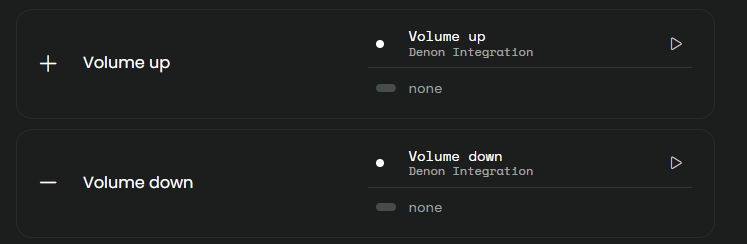
@kowalmisiek I’m using the Denon integration with my AVR-X4700H without any issues. I think you did try the integration and have now reverted back to IR; is that correct? I mapped as below.
The firmware version of the remote control is System version 2.6.12
I use the integration entity as a pilot.
At the moment, I’m using IR commands to operate the DENON. The only two buttons I use are the Volume up and Volume down buttons, and the IP integration.
PS. I’m using IR and IP because some sources weren’t supported in IP integration. For example, Media Player and a few others. That’s why I started mapping IR commands.
It’s strange that you don’t see Media Player as a source in the IP integration as I see that as an option on my X6500H and have used that in activities previously.
I’d run the integration setup again. You should have a media player entity.
On my 6800 it exposed two entities. One remote and one media player.
And the Denon integration had a delay in the commands sent from the remote entity prior to I believe 2.8.1
I ran it on a media player and it’s much better. Thanks for your suggestions.
Wait, what was the fix?
New BETA FW just released should fix the volume control issues via TelNet for several models.
I have the option for beta installations enabled, but I still have the volume issue. I assume you mean the dock FW has to be updated. I have 0.10.0. Is that the beta you are referring to? If not, how do I force an update to the newest beta?
No, Remote FW BETA 2.8.3
This includes the latest version of the Denon Integration, works flawlessly after that again.
I think you have a R2 with Dock 2. For R2 there is last firmware 2.6.12 ad for the Dock your 0.10.0
Ralf