Major update: Integration completely rewritten using oAuth2 instead of PAT for long live token, it will require additional steps during integration. make sure to read the README.md verycarefully
Hey everyone, i am releasing my Samsung Smartthings integration.
Before i got into features etc, i do want to be upfront and transparent about one issue with this integration.
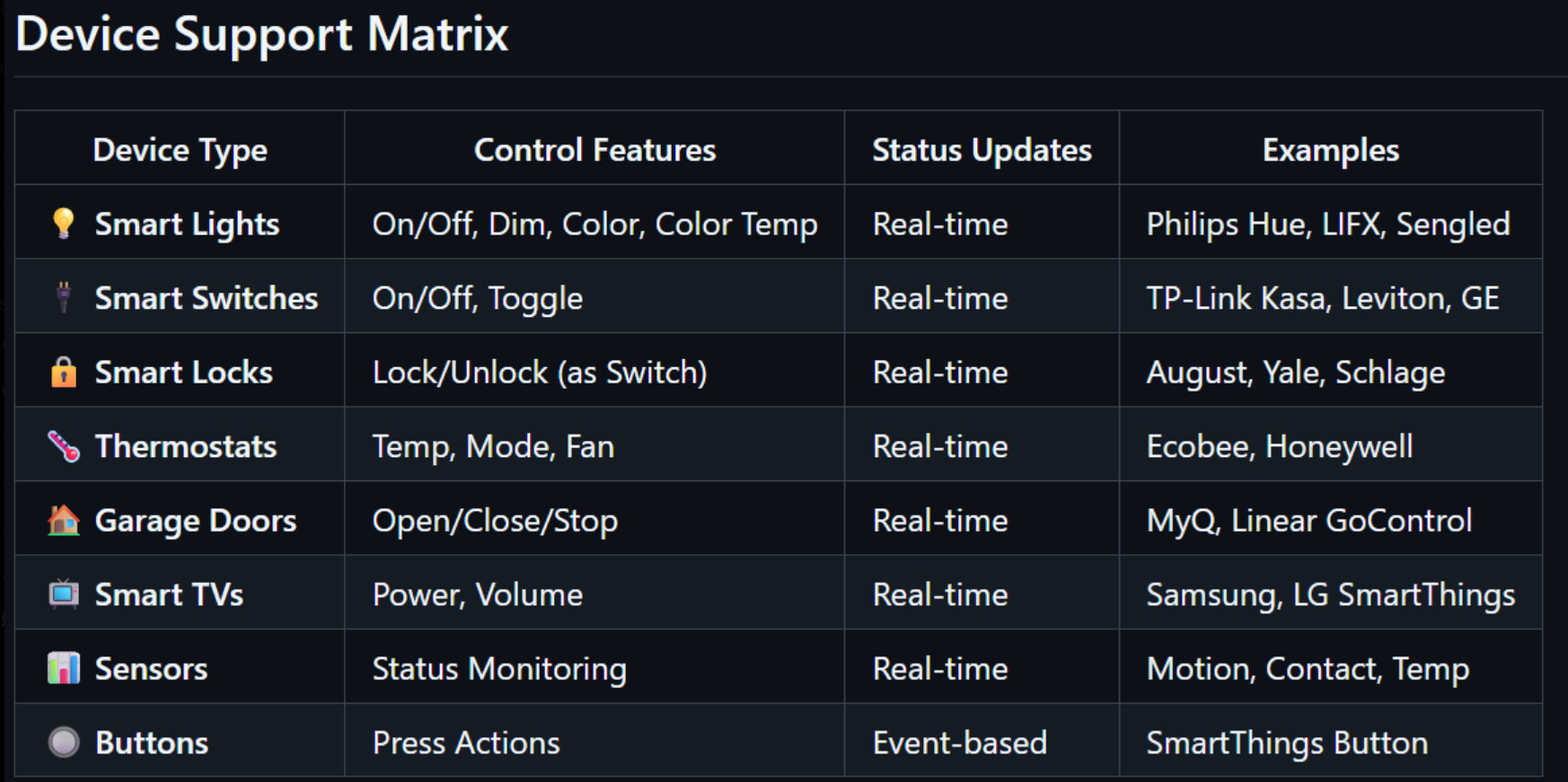
Due to the way Smartthings work, to make this integration Free/Open Source without the mandatory requirement for a hosted public facing SmartApp (webhooks) i had to use a Pull Method, the downside is that there will be a delay between state change and what the remote will reflect on the screen - This is a trade off to get this integration to work. At some point in the future when UC Team make Smartthings integration baked into the remote firmware, they will most likely to host and maintain their own SmartApp (webhooks) with WWST (Work With Smartthings) Certification.
I did try my best and this integration does work and is a decent solutions for those who have Smartthings and not (or dont want to) have Home Assistant (which integrate with Smartthings perfectly).
I went into a full rabbit hole researching smartthings and with every attempt i reached the same conclusion: to make this non complex for users or free i need to use pull method…
Now, for features should you still use this:
The integration automatically detects and categorizes your configured SmartThings devices (to the best of my ability to map devices)
Easy instructions for implementation, you will need a PAT token, paste it in and that’s it.
Please review the full README.md file
Thanks for this @M.a.S.e I’ve been hoping for this, and will give it a try this evening when I get home. Do you know if Samsung Soundbars are supported?
I just added sound bar support today in the latest release. I don’t have one so hopefully it will work. Anotehr user helped me and he confirmed it’s working. Use latest release.
@M.a.S.e I installed the integration tonight, and was able to connect to my Q90R. While all the power options work however all of the Volume buttons return Internal Server Error. Please try later.
Is there any chance we could also get access to the soundbar’s input sources?
Once again, thank you for developing this integration.
All, i have completely rewritten this integration using oAuth2 as i learned that Samsung changed PAT tokens to live for only 24 hours, therefore this new version is a complete rewrite using oAuth2, however it does require some “complex” steps to take in order to use this integration. please read carefully the README.md file and follow the steps. once done, this integration will remain and not timeout.
latest version 2.0.10
Meir, I’ve only just started to use this to control my Q90R soundbar, and discovered that when the remote is restarted, the Soundbar entity becomes unavailable and the only way I can use it again is to delete the entity and re-add it. While this isn’t a huge issues, It is inconvenient. Any thoughts on a workaround for this?
I had some issues with my Ecobee Thermostat entities. The temperature on the display defaults to 30 degrees and I cannot change it. When I change it, I get a network error for both of my thermostats. I tried setting up the Integration both with my installed Samsung Smartthings app OAuthId/ClientId as well as the Smartthings cli OAuthId/ClientId per the GitHub instructions and both integration setups had the same issue with the Ecobee thermostats. Here’s a snippet of the logs:
hey. would love to help, however unfortunatily with the level of inforamtion you provided it is hard to do so. can you join the discord channel and share exactly what you done and where you stuck? when during setup you got that error, which step in the instructions you got stuck etc.