Pat17
November 3, 2026, 7:20pm
21
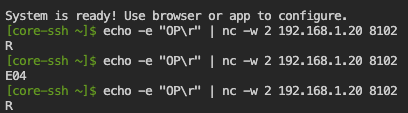
I progress somewhat… I tried to test manually some commands, with some success -
When sending the command for the first time, the tray did eject normally. When re-sending them, it didn’t close (the command is supposed to be the same) and returned he error ‘E04’. When closing it with the remote, and sending the command for the third time, it did open again.
Now I have to figure out how to make sure the integration file created through Gemini AI doesn’t work as a whole.
If anyone has any suggestion on the direction to investigate, I would be most grateful!
For my Pioneer open is OP\r and close CO\r
Ralf
Pat17
November 4, 2026, 7:29am
23
Thanks Ralf!
Is there a link to all your pioneer’s commands?
Surprisingly, nothing works this morning, although I set the pannde on fixed IP
No tray ejection, no ‘R’ written to confirm the command has been executed…
All my commands are
pioneer_bdp450:
  Features:
    'Off':
      Type: tcp-text
      Parameter:
        address: 192.168.178.74:8102
        text: "/A181AFBC/RU"
    'On':
      Type: tcp-text
      Parameter:
        address: 192.168.178.74:8102
        text: "/A181AFBA/RU"
  Simple Commands:
    power_off:
      Type: tcp-text
      Parameter:
        address: 192.168.178.74:8102
        text: "/A181AFBB/RU"
    power_on:
      Type: tcp-text
      Parameter:
        address: 192.168.178.74:8102
        text: "/A181AFBA/RU"
    fwd_skip:
      Type: tcp-text
      Parameter:
        address: 192.168.178.74:8102
        text: "/A181AF3D/RU"
    rev_skip:
      Type: tcp-text
      Parameter:
        address: 192.168.178.74:8102
        text: "/A181AF3E/RU"
    open:
      Type: tcp-text
      Parameter:
        address: 192.168.178.74:8102
        text: "OP"
    close:
      Type: tcp-text
      Parameter:
        address: 192.168.178.74:8102
        text: "CO"
    exit:
      Type: tcp-text
      Parameter:
        address: 192.168.178.74:8102
        text: "/A181AF20/RU"
    home_menu:
      Type: tcp-text
      Parameter:
        address: 192.168.178.74:8102
        text: "/A181AFB0/RU"
    popup_menu:
      Type: tcp-text
      Parameter:
        address: 192.168.178.74:8102
        text: "/A181AFB9/RU"
    cursor_up:
      Type: tcp-text
      Parameter:
        address: 192.168.178.74:8102
        text: "/A184FFFF/RU"
    yellow:
      Type: tcp-text
      Parameter:
        address: 192.168.178.74:8102
        text: "/A181AF63/RU"
    cursor_left:
      Type: tcp-text
      Parameter:
        address: 192.168.178.74:8102
        text: "/A187FFFF/RU"
    cursor_enter:
      Type: tcp-text
      Parameter:
        address: 192.168.178.74:8102
        text: "/A181AFF4/RU"
    cursor_right:
      Type: tcp-text
      Parameter:
        address: 192.168.178.74:8102
        text: "/A186FFFF/RU"
    red:
      Type: tcp-text
      Parameter:
        address: 192.168.178.74:8102
        text: "/A181AF60/RU"
    cursor_down:
      Type: tcp-text
      Parameter:
        address: 192.168.178.74:8102
        text: "/A185FFFF/RU"
    blue:
      Type: tcp-text
      Parameter:
        address: 192.168.178.74:8102
        text: "/A181AF62/RU"
    page_up:
      Type: tcp-text
      Parameter:
        address: 192.168.178.74:8102
        text: "/A181AF26/RU"
    page_down:
      Type: tcp-text
      Parameter:
        address: 192.168.178.74:8102
        text: "/A181AF27/RU"
    forward_scan:
      Type: tcp-text
      Parameter:
        address: 192.168.178.74:8102
        text: "/A181AFE9/RU"
    reverse_scan:
      Type: tcp-text
      Parameter:
        address: 192.168.178.74:8102
        text: "/A181AFEA/RU"
    stop:
      Type: tcp-text
      Parameter:
        address: 192.168.178.74:8102
        text: "/A181AF38/RU"
    pause:
      Type: tcp-text
      Parameter:
        address: 192.168.178.74:8102
        text: "/A181AF3A/RU"
    digit_0:
      Type: tcp-text
      Parameter:
        address: 192.168.178.74:8102
        text: "/A181AFA0/RU"
    digit_1:
      Type: tcp-text
      Parameter:
        address: 192.168.178.74:8102
        text: "/A181AFA1/RU"
    digit_2:
      Type: tcp-text
      Parameter:
        address: 192.168.178.74:8102
        text: "/A181AFA2/RU"
    digit_3:
      Type: tcp-text
      Parameter:
        address: 192.168.178.74:8102
        text: "/A181AFA3/RU"
    digit_4:
      Type: tcp-text
      Parameter:
        address: 192.168.178.74:8102
        text: "/A181AFA4/RU"
    digit_5:
      Type: tcp-text
      Parameter:
        address: 192.168.178.74:8102
        text: "/A181AFA5/RU"
    digit_6:
      Type: tcp-text
      Parameter:
        address: 192.168.178.74:8102
        text: "/A181AFA6/RU"
    digit_7:
      Type: tcp-text
      Parameter:
        address: 192.168.178.74:8102
        text: "/A181AFA7/RU"
    digit_8:
      Type: tcp-text
      Parameter:
        address: 192.168.178.74:8102
        text: "/A181AFA8/RU"
    digit_9:
      Type: tcp-text
      Parameter:
        address: 192.168.178.74:8102
        text: "/A181AFA9/RU"
    clear:
      Type: tcp-text
      Parameter:
        address: 192.168.178.74:8102
        text: "/A181AFE5/RU"
    enter:
      Type: tcp-text
      Parameter:
        address: 192.168.178.74:8102
        text: "/A181AFEF/RU"
    audio:
      Type: tcp-text
      Parameter:
        address: 192.168.178.74:8102
        text: "/A181AFBE/RU"
    subtitle:
      Type: tcp-text
      Parameter:
        address: 192.168.178.74:8102
        text: "/A181AF36/RU"
    angle:
      Type: tcp-text
      Parameter:
        address: 192.168.178.74:8102
        text: "/A181AFB5/RU"
    front_light:
      Type: tcp-text
      Parameter:
        address: 192.168.178.74:8102
        text: "/A181AFF9/RU"
    repeat:
      Type: tcp-text
      Parameter:
        address: 192.168.178.74:8102
        text: "/A181AFE8/RU"
    repeat_off:
      Type: tcp-text
      Parameter:
        address: 192.168.178.74:8102
        text: "/A181AF23/RU"
    display:
      Type: tcp-text
      Parameter:
        address: 192.168.178.74:8102
        text: "/A181AFE3/RU"
    function:
      Type: tcp-text
      Parameter:
        address: 192.168.178.74:8102
        text: "/A181AFB3/RU"
    top_menu:
      Type: tcp-text
      Parameter:
        address: 192.168.178.74:8102
        text: "/A181AFB4/RU"
You must add a \r to the commands
Ralf
Pat17
November 4, 2026, 4:07pm
25
Many thanks for sharing, Ralf!
Pat17
November 4, 2026, 9:26pm
27
Unfortunately I cannot say… As mentioned earlier, I cannot reproduce the experiment that was successful yesterday - the Pannde doesn’t react when directly instructed through HA’s SSH to open the tray.
On a side note, I’m surprised your file both contains commands in hexadecimals and in alphabetic formats. Does it work well at your end? As said in the title, I’m a complete newbie and still has difficulties to grasp the whole matter!
As long as I tested it yes but now the place of the Pioneer is a shelf. I guessed that the hex entries might be IR over IP
Ralf
Pat17
November 6, 2026, 5:46pm
29
It works at last…
The issue was my storing the codes on a Word file which was changing the single quotes into double quotes. I feel really bad, a lot of time spent for such a small issue.
Anyway, I have managed to successfully test quite a few codes, including hexadecimal ones. Some are surprisingly not working, such as ‘PA\r’ for pause.
Most important, with regard to my initial quest, there are a few query instructions that seem to work, such as ?A, ?D, ?K, ?L, ?R, ?T, ?Z. I need to map them, in both playbacks - music and movies.
This will be my next homework!