can anyone help with the global cache and lumagen integration please?
is there a setting on the global cache that needs setting?
any help would be great, thanks in advance, pete
can anyone help with the global cache and lumagen integration please?
is there a setting on the global cache that needs setting?
any help would be great, thanks in advance, pete
Hello,
I went through some difficulties with it as well:
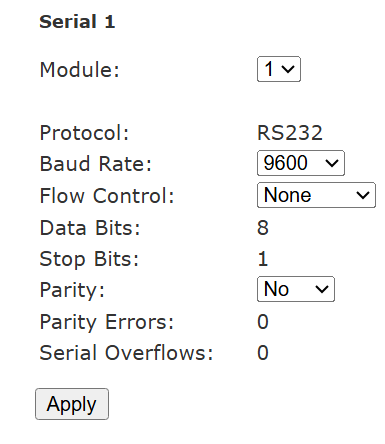
I remember I changed something on this page, but I’m not sure what …
But by default, there is something that should be different.
If you try with the exact value as on the screen shot, hopefully it will work.
Hoping this few input will be valuable and helpfull.
Regards
Guillaume
Hello,
Have you been able to try out ?
Is it working?
If you need further help, don’t hesitate
No luck, set Lumagen back to defaults and reset it for serial but still no go, il keep trying, cheers
Hello,
Is the Lumagen turned on? It must be
And also on the Lumagen ensure the following set up is correct on the RS232 set up page:
Echo: On
Delimiters: On
Report mode changes: Fullv4 (ensure you’re selecting Full v4).
Hope it helps
Hello,
Have you made progress with your Lumagen ?
Regards
Guillaume
actually what cable are you using ?
RS232 cable from Lumagen processor to Global caché.
Ethernet cat 6 cable from Global caché to router.
theres a few cables, null cable and straight , i have a null ( which i think is the wrong one )crossover cable. i think i need a straight cable? thanks
Oh yes, now that you talk about it, I remember about this.
Unless I’m mistaken, I have a null cable.
I will check and confirm.
I can confirm that I use a null RS232 cable.
The precise model is Dtech DT-9006C and with that cable, it works fine.
I’m having a similar problem and what would be great to have is the exact sequence of steps and screen shots. Are these steps correct?:
I’m oversimplifying, but these steps do not work for me. I continue to get an error message–> Driver not connected. Failed to connect to host: Connection refused (os error 111).
The configurator is trying to use port 4999. Do I need to do an update somewhere to make that work?
Update: After a careful walkthrough with ChatGPT guiding me through the steps, I finally got it working. If everything isn’t done in sequence (including a reset of the Global Caché by unplugging it and plugging it back in), error messages persist.
New question: How do you get the Lumagen to switch inputs? I’ve tried INPUT followed by the input number as well as INPUT SOURCE (HDMI1, HDMI2, etc.) and I can’t get either to work.
You just use the number, same as the native Lumagen remote
For anyone else that has problems, having set this up previously, and then removing it, I hadn’t been able to get it installed again due to the “Driver not connected. Failed to connect to host: Connection refused (os error 111)”. Here is what eventually worked for me. BTW I am using a GC-100 Global Cache device.