| 2026-03-22 09:09:40.327474 +00:00 |
core |
NOTICE |
Enter idle mode: standby in 173s |
| 2026-03-22 09:08:51.867284 +00:00 |
core |
NOTICE |
[uc.main.f34de9ad-6783-4e84-81ce-d0b95de2e61b] activity ‘Watch TV’ is running and preventing device standby |
| 2026-03-22 09:08:51.866795 +00:00 |
core |
NOTICE |
[Watch TV] activity finished |
| 2026-03-22 09:08:51.858142 +00:00 |
core |
NOTICE |
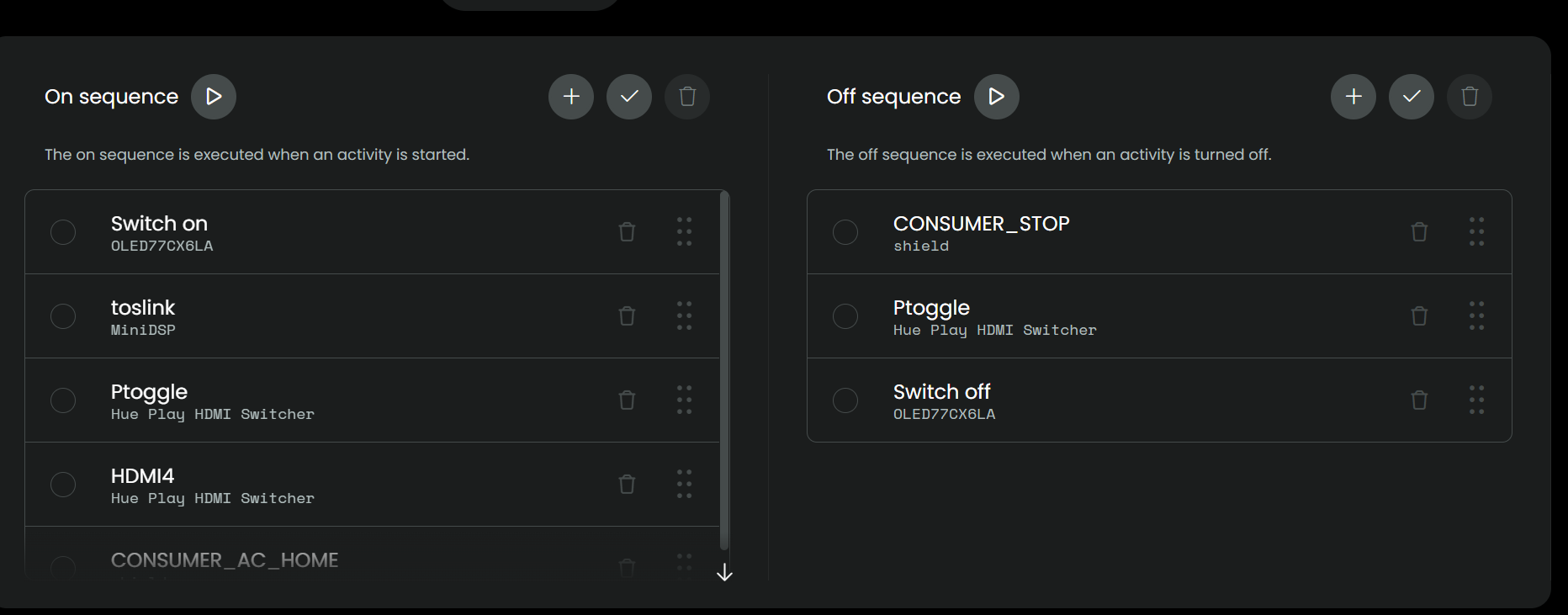
[Watch TV] activity command: uc_bt.main.profile1:CONSUMER_AC_HOME |
| 2026-03-22 09:08:51.690824 +00:00 |
core |
NOTICE |
[Watch TV] activity command: uc.main.4f9d3ec4-f0ae-4ac3-9aa2-b474ac760471:HDMI4 |
| 2026-03-22 09:08:51.524166 +00:00 |
core |
NOTICE |
[Watch TV] activity command: uc.main.4f9d3ec4-f0ae-4ac3-9aa2-b474ac760471:Ptoggle |
| 2026-03-22 09:08:51.395777 +00:00 |
core |
NOTICE |
[Watch TV] activity command: uc.main.94236788-b630-4aba-9d9d-25049c836b49:toslink |
| 2026-03-22 09:08:51.389353 +00:00 |
core |
NOTICE |
[Watch TV] activity command: lgwebos_driver.main.media_player.b4:b2:91:55:ea:14:media_player.on |
| 2026-03-22 09:08:51.388773 +00:00 |
core |
NOTICE |
Added standby inhibitor: Active activity ‘Watch TV’ |
| 2026-03-22 09:08:51.387094 +00:00 |
core |
NOTICE |
Started activity ‘Watch TV’ (uc.main.f34de9ad-6783-4e84-81ce-d0b95de2e61b) with timeout of 300s |
| 2026-03-22 09:08:49.010908 +00:00 |
core |
NOTICE |
Setting rgb button backlight to: (125, 125, 125) |
| 2026-03-22 09:08:49.009067 +00:00 |
core |
NOTICE |
Enter normal mode: standby in 180s |
| 2026-03-22 09:08:48.324785 +00:00 |
core |
NOTICE |
Setting rgb button backlight to: (0, 0, 0) |
| 2026-03-22 09:08:48.322784 +00:00 |
core |
NOTICE |
Enter idle mode: standby in 173s |
| 2026-03-22 09:08:42.309320 +00:00 |
core |
NOTICE |
Removed standby inhibitor: activity ‘Watch TV’ (off) (max 305s) |
| 2026-03-22 09:08:42.308616 +00:00 |
core |
NOTICE |
[Watch TV] activity finished |
| 2026-03-22 09:08:42.186842 +00:00 |
core |
NOTICE |
[Watch TV] activity command: uc.main.4f9d3ec4-f0ae-4ac3-9aa2-b474ac760471:Ptoggle |
| 2026-03-22 09:08:42.171661 +00:00 |
core |
NOTICE |
[Watch TV] activity command: uc_bt.main.profile1:CONSUMER_STOP |
| 2026-03-22 09:08:38.155186 +00:00 |
core |
NOTICE |
[Watch TV] activity command: lgwebos_driver.main.media_player.b4:b2:91:55:ea:14:media_player.off |
| 2026-03-22 09:08:38.154685 +00:00 |
core |
NOTICE |
Added standby inhibitor: activity ‘Watch TV’ (off) (max 305s) |
| 2026-03-22 09:08:38.152938 +00:00 |
core |
NOTICE |
Started activity ‘Watch TV’ (uc.main.f34de9ad-6783-4e84-81ce-d0b95de2e61b) with timeout of 300s |
| 2026-03-22 09:08:33.056005 +00:00 |
core |
NOTICE |
Setting rgb button backlight to: (125, 125, 125) |
| 2026-03-22 09:08:33.054046 +00:00 |
core |
NOTICE |
Enter normal mode: standby in 180s |
| 2026-03-22 09:08:32.322694 +00:00 |
core |
NOTICE |
Standby mode is inhibited by: [Active activity ‘Watch TV’, Web configurator] |