Firstly, this is a really nice/useful integration and is greatly appreciated but I have a quick question?…
Quite a few of my integrations show:
“This integration update cannot preserve your current configuration automatically because:
The integration does not support automatic configuration backup”
Is there an easy way to find out if the latest version of a particular integration supports automatic configuration backup?
If the integration has supports_backup = true then it supports the automatic restore process. But also remember that the version you are running has to support it, not the version you are upgrading to. (The new version of course supports it as well) Basically the integration version that is installed needs to be able to backup its data for it to be restored in the newly installed version.
Cheers Jack - That’s exactly what I was looking for.
From this, I was able to ascertain that 1/5 of the available updates for my integrations supports the automatic restore process so I went ahead and only updated that one
You can also tell in the app itself. The ones without a warning icon in the update button are “safe” to upgrade. The others work fine too but you have to run through setup afterwards just like if you updated them from the web configurator
Understood Jack but your registry file is still super useful for me to decide if I want to go through the hassle of upgrading an integration that doesn’t support the automatic restore process or not.
For info and I could’ve done something wrong but my existing version of the “Yamaha AVR” integration was showing as “unsafe” even though it was already above the minimum version of “1.0.0”…
Yeah… I fixed that yesterday actually. I accidentally forgot to set it in the registry 11 updates ago. I have been making you all re-run setup for the last 2 months unnecessarily.
Sorry it’s taken me a while to get back to this. I still seem to have a problem. I can switch back and forth between successfully configuring the two instances by waiting (75 minutes) between shutting one down and starting the other. However, regardless of which sequence I have them running, when I start a second instance, I get errors like below. It’s zeroconf related, but I can’t tell if it’s the same issue @uvjim states.
intg-mgr-fam | DEBUG:ucapi.api:Publishing driver: name=intg_manager_driver._uc-integration._tcp.local., host=barney.local.:9092
intg-mgr-fam | Traceback (most recent call last):
intg-mgr-fam | File “/app/intg-manager/driver.py”, line 70, in
intg-mgr-fam | asyncio.run(main())
intg-mgr-fam | File “/usr/local/lib/python3.11/asyncio/runners.py”, line 190, in run
intg-mgr-fam | return runner.run(main)
intg-mgr-fam | ^^^^^^^^^^^^^^^^
intg-mgr-fam | File “/usr/local/lib/python3.11/asyncio/runners.py”, line 118, in run
intg-mgr-fam | return self._loop.run_until_complete(task)
intg-mgr-fam | ^^^^^^^^^^^^^^^^^^^^^^^^^^^^^^^^^^^
intg-mgr-fam | File “/usr/local/lib/python3.11/asyncio/base_events.py”, line 654, in run_until_complete
intg-mgr-fam | return future.result()
intg-mgr-fam | ^^^^^^^^^^^^^^^
intg-mgr-fam | File “/app/intg-manager/driver.py”, line 63, in main
intg-mgr-fam | await driver.api.init(“driver.json”, setup_handler)
intg-mgr-fam | File “/usr/local/lib/python3.11/site-packages/ucapi/api.py”, line 176, in init
intg-mgr-fam | await zeroconf.async_register_service(info)
intg-mgr-fam | File “/usr/local/lib/python3.11/site-packages/zeroconf/asyncio.py”, line 197, in async_register_service
intg-mgr-fam | return await self.zeroconf.async_register_service(
intg-mgr-fam | ^^^^^^^^^^^^^^^^^^^^^^^^^^^^^^^^^^^^^^^^^^^
intg-mgr-fam | File “/usr/local/lib/python3.11/site-packages/zeroconf/_core.py”, line 362, in async_register_service
intg-mgr-fam | await self.async_check_service(info, allow_name_change, cooperating_responders, strict)
intg-mgr-fam | File “/usr/local/lib/python3.11/site-packages/zeroconf/_core.py”, line 560, in async_check_service
intg-mgr-fam | raise NonUniqueNameException
intg-mgr-fam | zeroconf._exceptions.NonUniqueNameException
You haven’t run through setup on the remote yet. Add a new integration, it should be discovered on your network, and run through the wizard. After you do that the web server will start
I have a beta release out with multiple remote support. It’s looking very good and I plan to release it today or tomorrow. You can always upgrade to it early as well
Trying to upgrade to the latest version (v1.5.3). I selected update from within the UI and it seemed to just sit spinning. I believe it at least uninstalled as I now cannot reach the web ui (192.168.4.205:8181).
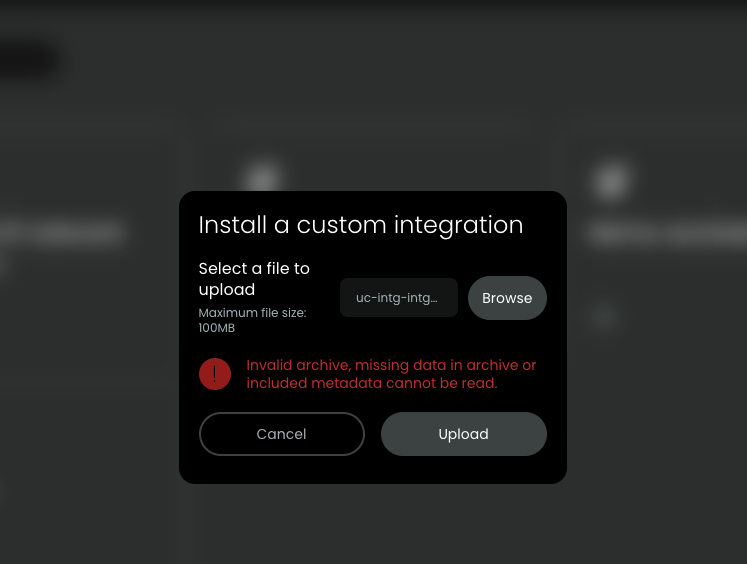
So, I attempted to reinstall from Github but am getting nowhere, see image below.
You did not correctly download the .tar.gz file. You simply clicked on the link. Use right mouse button and select download. I assume you used chrome or safari.use different browser or use tablet.