aruit
October 12, 2025, 6:53pm
1
I want to rename the default page name “New page” into another name “Hoofdpagina”, but then I get an error “Invalid request. Check your input.“.
BUG:
BYPASS:
Were do you want to create a page? I tried in activity and customize your remote and the page is called “untitled”
I assume this is a user interface page in the activity.
If so, is the grid size larger than the default 4x6 and you placed one or more button(s) in the larger part of the grid?
Then you are running into this issue, for which I created a bug report:
opened 12:07PM - 07 Oct 25 UTC
bug
web configurator
### Is there an existing issue for this?
- [x] I have searched the existing iss… ues
### Description
On firmware version 2.7.0 beta, If I change the name of a User Interface page in an activity, the grid size of that page is changed to the default 4 column x 6 rows size.
- If the existing grid is smaller than the default, it gets expanded after the rename action.
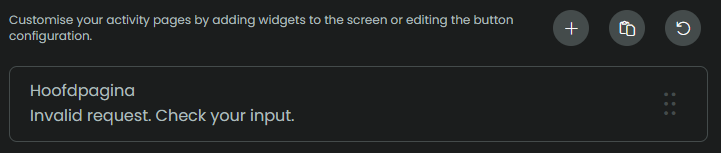
- If the existing grid is lager than the default and it contains elements that don't fit into the default 4x6 size, the web configurator shows an error. The page cannot be renamed:
<img width="1436" height="176" alt="Image" src="https://github.com/user-attachments/assets/9e92fb54-8b66-44b7-a276-fd20eea15011" />
### How to Reproduce
**Scenario 1: Smaller grid size than default**
1. Open the web configurator.
2. Go to Activities & Macro's > Select an activity.
3. In the activity go to the User Interface section.
4. Add a page (with standard grid size 4 cols x 6 rows).
5. Change the grid size of the page to **3 cols** x 6 rows.
6. Rename the page to something else.
7. Observe that the grid size has been reset to 4 cols x 6 rows.
**Scenario 2: Larger grid size than default**
1. Open the web configurator.
2. Go to Activities & Macro's > Select an activity.
3. In the activity go to the User Interface section.
4. Add a page (with standard grid size 4 cols x 6 rows).
5. Change the grid size of the page to **5 cols** x 6 rows.
6. Populate the first row with 5 buttons.
7. Rename the page to something else.
8. Observe the 'Invalid request. Check your input' error message under the page's name. The web configurator tries to reduce the grid size to the default 4 cols x 6 rows size, but fails in doing so als the extra (5th) column contains a button.
### Expected behavior
The web configurator should not change a custom grid size to the default size upon renaming a page.
### System version
v2.7.0 beta
### What part of the system affected by the problem?
Web Configurator
### Additional context
_No response_
You need to (temporarily) move those extra buttons to another page and change the page’s grid size back to the default size. Then you can rename the page. After that you can change back the grid size and re-add the extra buttons.
2 Likes
aruit
October 13, 2025, 7:43am
4
Thank you SunBeech, that is the problem and the bypass!
Thank you for solving a really vexing mystery which, until now, I could resolve only by not renaming the page.
1 Like