Hi all,
please bear with me as I’m very new to the Remote 3. After having configured Android TV for the Nvidia Shield (Pro) and then starting it, I can see lots of pre-defined shortcuts for well-known apps like Netflix, Waipu, ARD, ZDF, etc. on the remote’s screen, but is there a way to add additional shortcuts to this list for apps that are locally installed on the Shield but are not in the pre-defined list?
Yes you can add a custom string in the source line. You need the App ID, I think from the Play Store, and then:
market://launch?id=App ID
example:
market://launch?id=org.xbmc.kodi
Ralf
Thanks for the fast response … the App ID is not the problem … but where do I add this?
Source command.
I really appreciate your help, but I do not understand it. I do not know where this “Source command” feature is hidden in the UI.
I am talking about the predefined shortcuts that appear on the Android TV page when turning on Android TV and then clicking the four square icons on the bottom. Then I get a screen titled with “Apps” and with buttons like Youtube, Prime Video, Plex, Netflix, HBO Max, Max, Emby, Disney+, Apple TV, Spotify, Ziggo, Videoland, Steam Link, Waipu TV, Magenta TV, Zattoo, Pluto TV, ARD Mediathek, ZDF Mediathek, Kodi, 1und1, Arte, Google Play Store, DVB-C/T/S, ATV Inputs, ATV PlayFI, ATV Now on TV, ATV Media, ATV Browser, Quickline TV, and myCANAL. In this list, I would like to add an Android TV app that is not listed there (and if that is possible, also remove apps that are irrelevant for me).
You cannot add an app to this list. You can only add other commands to to GUI of an activity with the source command.
Ralf
You mean, clicking into Quelle (English Source) in the following screenshot, ignoring the list that opens, and blindly typing the market://launch?id=x.y.z string, hoping you don’t mistype because only the first two/three characters are visible at all?
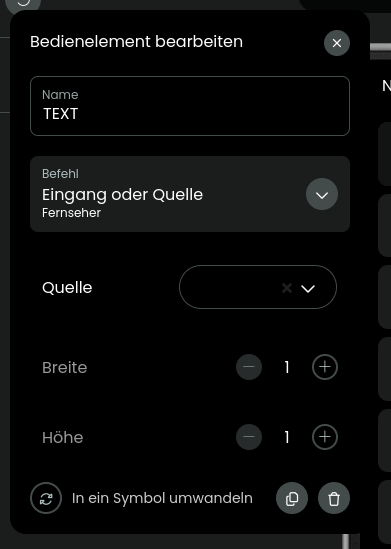
Yes, indeed this works. I would have never guessed that this is an input field because 1) it directly opens the list of choices and 2) does not behave like a text input box at all.
But even by defining an activity with start sequence Android TV and then Source to launch the specified app (which works fine!), then I have to re-do all GUI and key bindings and cannot directly use those of the Android TV entity?
No not in entity this can only be changed in the source code. Tip: type string in notepad, copy and then paste in source field.
Ralf
Copy&paste did not work for me. Perhaps this is browser and OS dependent.
Hi everyone,
I have two apps on my Shield TV that I’d like to launch directly via a shortcut. I’ve tried using market://launch?id=x.y.z, but instead of opening the app, it takes me to the Google Play Store page for that app, where I then have to manually press “Open.”
I’ve worked around it using a macro, but I’m wondering — is this the expected behavior, or am I missing something?
Thanks in advance!
Unlike Apple TV Android TV does not really have one way to start apps. In the source of the integration you see 2 other methods and with ADB I know a 3rd.
Look at the list and try other ways.
Which App do you want to start perhaps someone already succeeded.
Ralf
Hi Ralf
Thanks – they are Danish streaming apps (DRTV and TV2 Play), so I guess the chances that anyone has looked into them are pretty small  Anyways I can live with the macro workaround, just wanted to make sure that I wasn’t doing something wrong.
Martin
With Martin living there the chances are not the worst.
Does the DR TV app have a red icon with the play symbol and DR written beneath?
Ralf
Good point 
Yes, exactly (link to the play store: https://play.google.com/store/apps/details?id=dk.dr.webplayer) and the TV2 Play app is this one (https://play.google.com/store/apps/details?id=dk.tv2.tv2playtv).
Martin
Hi,
I tried 2 other methods for DRTV and failed. Sorry. But macro is a good alternative I think.
Ralf
1 Like
Hi Ralf,
Thank you very much for trying - really appreciate it. For now I’ll stick with the macro then
Martin
Hello
i own a Xiaomi mi TV (3rd version), i get all IDs apps via ADB command but i cannot start Emby (Android legacy, not Emby ATV) and MyCanal with source input: "market://launch?id=xxxx"
When i click on the button, nothing triggered.
What is the workaround?
You problem might come from the legacy app because market: is for Apps installed throughthe play store I think.
Did you install the ADB integration? There you get a select entity which shows all apps which are installed and with the source “APP:name of package” the app can often be started. It does not work with all Apps some needs to be started with a certain Achtivity which can be found with the App package browser.
Ralf
What do you see if you go to settings, apps then all apps and use the app ID under version. For example, for.VLC it’s “org.videolan.vlc” so the below. Just replace app is with whatever shows up under version in the TV or Android box settings. This is stated in the 2nd post except you don’t need the play store to.gey the app id. Any app, sideloaded or otherwise, has an app id. Google can’t block this as far as I’m aware but with reskinned Android TV boxes who knows.
market://launch?id=org.videolan.vlc
You can also install Button Remapper to use any quick app physical buttons to do other things like open other apps and use those buttons. It also gives you double tap and long hold options for any buttons you add.