100% Home Assistant entities

History

Last year, when I configured my remote, I did everything in Home Assistant. Not only did I pull my entities from there, I also use Home Assistant Automations/Scripts rather than Remote 3 Activities/Macros.

When I wanted to switch between “activities”, it got really tough to keep track of everything, so after a year of not using the remote, when I pulled it out this year, I did it the opposite. I did 100% Remote 3 + integration with no Home Assistant.

Benefits of Home Assistant

My goal was to be able to control these devices from Home Assistant without my Remote 3 or add a dashboard to help with it. Why? Because I wanted to have that control.

Also, putting everything in Home Assistant means I have 1 place for configuration, and all the remotes can simply share the configs from Home Assistant.

Benefits of Integrations

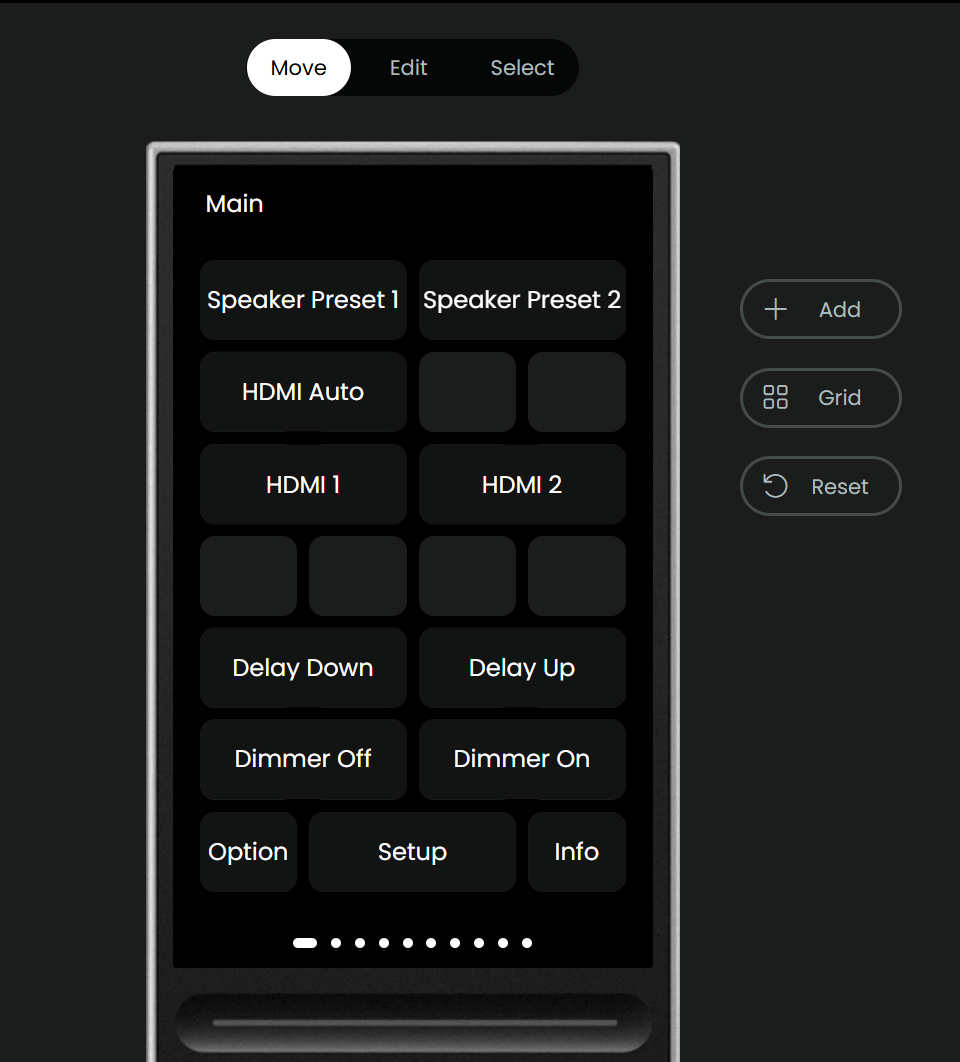
If you do integrations on the device itself, you get these awesome pre-configured remote views with buttons already programmed into the remote:
Question

I’d still like to go back to 100% Home Assistant, but I’m not sure if it makes sense. The “Remote” entities seem super valuable from these integrations.

How are you guys using Home Assistant and sharing configs? Do you add the integrations only for their Remote entity and leave the rest to Home Assistant?

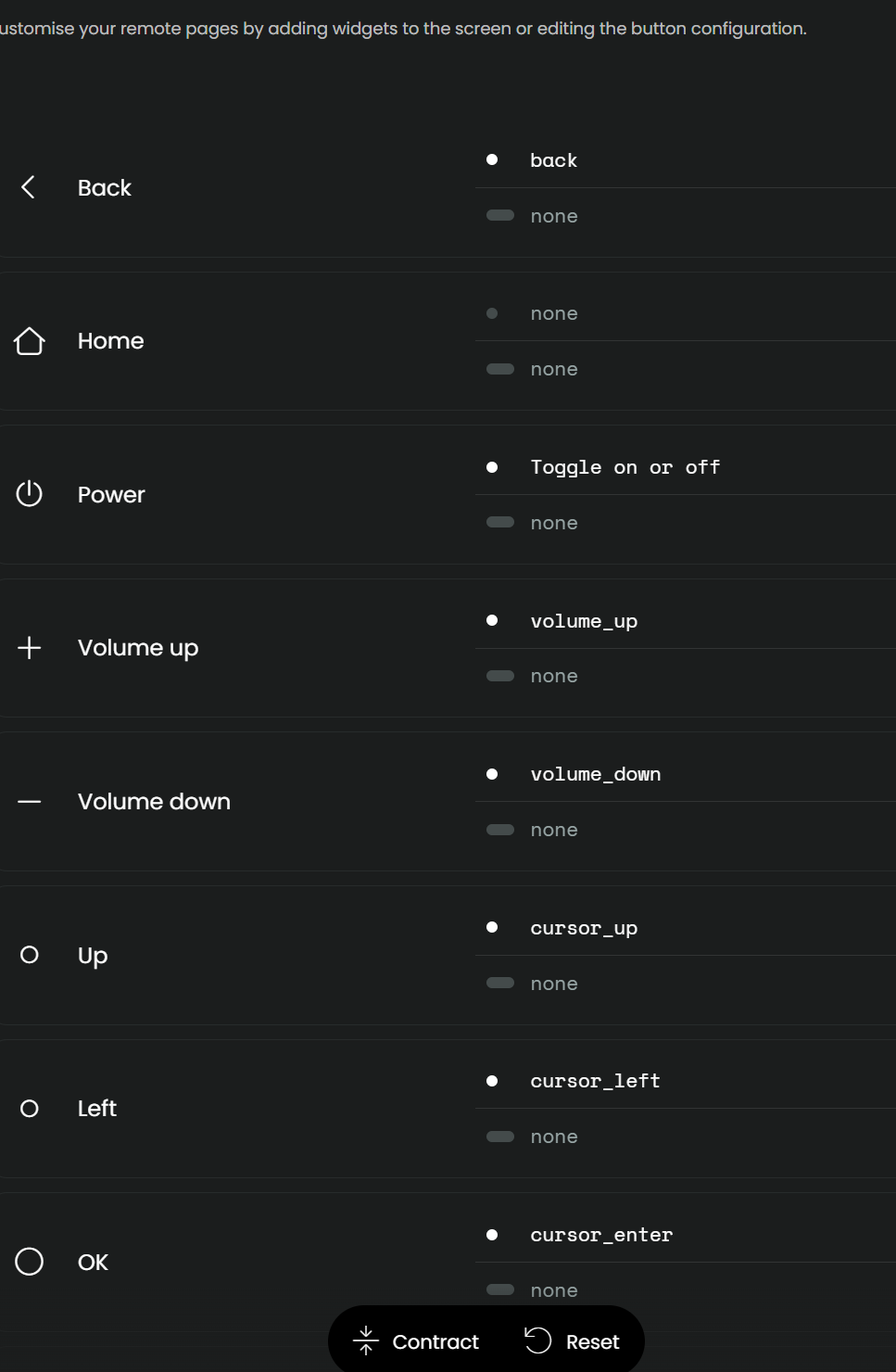
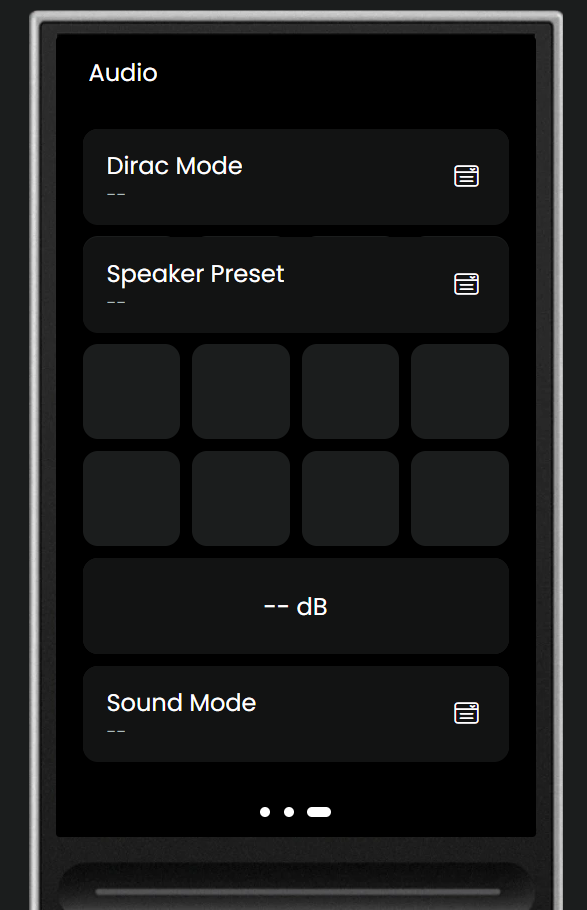
How are you handling icon-style configs like this without those Remote 3 entities? Home Assistant doesn’t have all of the ones the configurations give you:
At the beginning of my Remote 2/3 journey, I was relying heavily on Home Assistant (the remote was actually the main reason to look into HA), because a lot of the integrations that are now available did not exist. E.g. for my Lyngdorf receiver I created scripts leveraging IP commands to control the device. The downside was that every script represented one entity on the Remote 2/3 side. Same for my Sky Q receiver. Creating activities then required the addition of a lot of entities and it became quite messy. With dedicated integrations on the remote itself this is now much cleaner.

Nowadays, I use integrations on the remote wherever possible and currently only rely on Home Assistant for Hue lights since the remote integration does not support scenes.

1 Like

I have all entities that are IR or BT based added in the remote itself. All IP entities are in Home Assistant and then forwarded to the remote. Everything is directly controllable in the remote.

Never noticed any missing properties, but my setup is rather simple:

  • IR controlled amplifier
  • IR controlled DAC
  • IR and IP combined controlled TV
  • IP and BT combined controlled Apple TV
  • IP controlled PC
  • Some sensors in Home Assistant

For each activity I created a separate boolean helper switch in Home Assistant that’s also forwarded to the remote.

Each activity contains all the needed entities in the remote, plus the according boolean switch.

The sequencing for each activity consists of just that one boolean switch. Nothing else.

When the remote switches a boolean switch on or off, all the logic happens within Home Assistant. When the switch is turned on, the remote is happy and when something in the automation fails, I have some safeguards and notifications set up so either Home Assistant itself resolves the issue or I’ll get a notification.

Once in an activity all controls are done by the remote itself.

So for each activity I have created two automations (for on and off) and also for a few devices that stay on within multiple activities. So, yes that’s quite a lot of automations, but it has been rock solid ever since I built it this way.

Especially when something fails it’s very nice to have the safeguards in place, something you can’t really do in the remote itself.

Also when there’s waiting time for some devices after powering on or off, in Home Assistant you can build really nice state or time based conditions

2 Likes

There’s a thing called Stateful Scenes, available in HACS which creates switches for your scenes, that also will be switched on or off according to your scenes. Really helpful in your situation

1 Like

Thanks. What I meant is that the Hue integration provided by UC does not support scenes which is why I import scenes from the Hue integration in HA which works without a problem.

1 Like

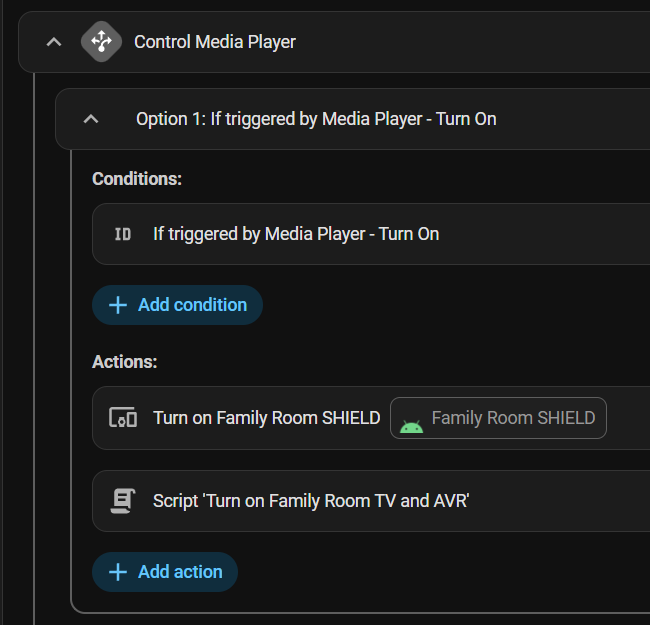
Home Assistant automation

This is what I had in the past. Sound very much like what you’re doing:

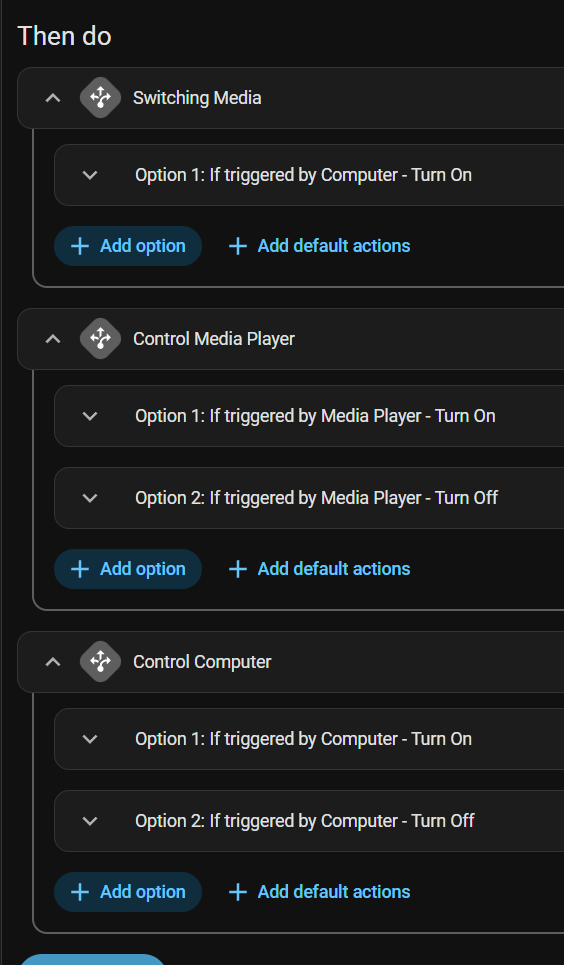
I try to minimize the number of automations I have. I write scripts for repeat stuff and use trigger IDs to maintain single automations with multiple paths. This one:

Swapping activites is challenging

But I stopped using Home Assistant for the remote because I didn’t wanna turn off my TV when switching activities to one that used the TV.

How the remote switches activites

That’s the thing I was having the most trouble figuring out. I have an idea how to fix it. Maybe some sort of boolean setup like you said. “TV is on” then if that boolean is set, don’t run the “off” if we’re switching activities rather than coming from the “off” state.

That’s how the remote itself works. It doesn’t turn off devices where those entities exist in the activity you’re switching to. It’s pretty jank on paper, but activity switching on the remote has worked for me without issue so far.

Getting multiple states in Home Assistant

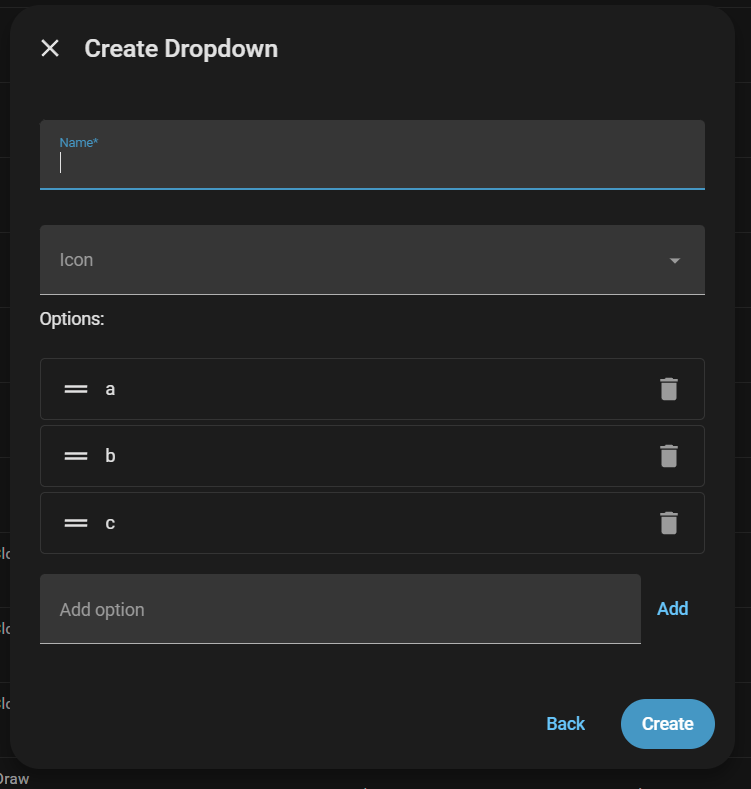
I thought of using a multi-select dropdown instead of a bunch of toggles (booleans), but that’s simply not possible. Select’s are single-selection only:

Something I did in another automation was parse strings. I used a text field, stored a special-character-separated list and used Template actions to separate those out into separate states, then I stored those in a Variables action. It’s all pretty convoluted to get a simple multi-select entity without a bunch of disconnected booleans :confused:.

What’s your solution?

What’d you do to handle activity switching?

I’m doing kind of the same thing when it comes to repeated actions. I only create (template) helpers, which I can re-use in automations, instead of scripts, but basically that’s the same thing I guess.

Opposite to you I’m making seperate automations for basically each action. I went for large and complicated automations at first, but noticed when somethings fail or hang, Home Assistant is not very good at letting the automation continue, even though I’ve set the ‘continue on failure’ option to all of the actions (Plus the automations are easier to maintain when they’re chopped to simple and small bits, which is also regarded as best practice in some other software).

About the activity switching:

Note: I have no problems with devices being, or remaining switched on, even when they’re not being used in a certain activity. Only exception is the TV

  • I have one helper boolean switch per activity which are controlled by the remote: This is programmed in the sequences of the activities of the remote: Per activity, the ‘On’ sequence switches the corresponding boolean switch on, ‘Off’ sequence switches the corresponding boolean switch off
  • I have one helper boolean switch called ‘AV Power’ which is controlled by the activity automations
  • For each activity I have two automations: ‘[activity name] On’ and ‘[activity name] Off’ - triggered by switching the boolean switch corresponding to the activity either on or off.
  • Each ‘[activity name] On’ automation will first switch on the ‘AV Power’ boolean switch (regardless of it already being on, it will then just remain on) and performs all other necessary steps afterwards
  • Each ‘[activity name] Off’ automation will handle all needed steps first and after a one second delay, -conditionally- switches off the ‘AV Power’ boolean switch. Condition: all other activity boolean switches are also switched off (so switching between activities leaves the ‘AV Power’ boolean switch and thus all devices on)
  • For each device I have two automations: ‘[device name] On’ and ‘[device name] Off’ - triggered by switching the ‘AV Power’ boolean switch either on or off
  • When the ‘AV Power’ boolean switch is switched on for the first time, it will trigger all ‘[device name] On’ automations. (In the ‘TV On’ automation I’ve set some conditions, because I don’t use the TV in all activities)
  • When the ‘AV Power’ boolean switch is switched off, it will trigger all all ‘[device name] Off’ automations

On top of this I have some ways in detecting whether all devices behave like they should and when not, I have have made some measures to automatically get them them to the desired state. And especially this is where, for me at least, the benefit lies of letting Home Assistant handle the sequencing.

For instance, my DAC, which is IR controlled and has no directly selectable inputs, I’ve made a setup containing light detectors sticked to the front panel, connected to a ESP32 board and added to Home Assistant. So in Home Assistant I can monitor if it’s powered on and set to the correct input. If not, a looped automation will run until the desired state is achieved. If that fails, I’ll be notified on my phone. The same setup also works for my IR controlled amplifier.

All these state sensors and action helpers are forwarded to the remote, so on the activity pages I can also monitor each state and manually adjust things without the need to open Home Assistant to get things right

On my side, I believe that UIs (touchpads, voice control, hard controllers, remotes) should be display-only devices and concentrate on user experience for the scope they are good at :
Voice control when your hands are not available (when in kitchen, when you arrive at home carrying things…),

Hand control when your eyes are not available (watching TV, in the car,…)

Visual control (touchscreen) when you need complex interaction.

This is how I have been fighting to integrate the remotes at home (Pronto, Nevo, Neeo and now YIO) and keep the “logic” on the home automation side (HomeAssistant, OpenHAB, Jeedom or whatever) behind the scene.

In my setup, the home automation system is aware of activities and hardware control (it seamlessly control TV input, amps, DAC, hardware and software including Kodi, Lyrion…) and exposes simple “virtual” devices (such as Living-room player) to the remote and the remote send “generic commands” to the room player translated into device-aware commands.

Then you can hide the complexity of activity navigation. “Starting an activity” is a clear concept for dummy users. “Closing and moving to another activity” is a concept that nobody want to cope with : that should be done by the “intelligence” of the system.

Interaction with the remote should only be intents like : “I want to watch TV”, “I want to listen to Qobuz”, “I want to watch a movie on the projector”. All the rest should be hidden.

The “intelligent system” should handle this. And the YIO software is far from doing so and is stuck into maintaining a useless on-the-remote setup capability on its tiny screen when everyone is using a web browser or a phone to set it up.. Navigation in sub-menus / groups is a concept that should be limited to devices settings but not daily use.

The “intelligence” and added-value of the remote should be to display the right player, information and commands at the right time without the need of going into menus or whatever. Without capabilities to control navigation between screen from the outside (from the HA system), this is hardly doable at this time :frowning:

I just started using my remote 3 recently, and I use a combination or native UC remote integrations and Home Assistant integrations. I decided to use the native UC remote integrations for my Apple TV, Shield, Kaleidescape, and Marantz processor. These are frequently used devices, so I figured there would be less latency and better performance not to go through HA for them.

However, for my JVC projector, I decided to use the HA JVC integration and export HA entities to the remote. JVC projectors only support a maximum of 1 IP client at a time. I want both my remote and HA to be able to communicate with the JVC projector. I use some automation in HA for when the projector turns on (send WOL to madVR Envy) and turns off (shutdown madVR Envy). Also, on a day-to-day basis, the remote 3 only needs to send power on and power off commands to the projector. It doesn’t need to send other commands unless I am doing minor tweaks. So, I figured using HA is the way to go for JVC integration. It’s also one less IP connection for the remote to reestablish when it wakes up.

Likewise, my remote never needs to send a command to madVR on a day-to-day basis. When the projector turns on, HA automation sends WOL to madVR Envy. So, the only time the remote needs to take to madVR is when I need (very seldomly) minor tweaks or checks. Maintaining an IP connection with madVR isn’t cheap. The IP connection needs to be maintained (need to send keep-alive every 20 seconds or so), and whenever the remote wakes up, it’s another IP connection to reestablish. So, I wonder if the remote has so many IP connections to reestablish, will it eventually slow down its responsiveness when you wake it up?

Correct me if I’m wrong, but I think if native remote integrations are added to the remote, but the activity currently being used does not include entities from an integration, the remote will still need to establish & maintain communications with the device? My preference would have been to have an option to only connect to a device (like madVR) if my activity is using that device; otherwise, don’t establish communications. Or maybe a lazy connection where it only connects the first time you try to use the device.

I suppose an advantage of using native remote integrations is that you get user interfaces as part of the integration and not have to build them up if using HA integration (generally good if you like the UI that comes with the native integration).

Question: if I make changes to the user interface pages that came with a native integration (such as the Denon/Marantz integration), what happens if I update that intergration in the future? Will my custom changes to the UI remain?

Yes. Your custom UI changes will remain. If you manually upgrade a custom integration you will need to run setup again and re-add the entities you need but activities (on/off sequences, UI and button mapping) will be intact. If you havent already taken a look the integration manager by Jack Powell is worth a look as It can help manage integration upgrades for you. GitHub - JackJPowell/uc-intg-manager: An Unfolded Circle Integration to manage your Unfolded Circle Integrations · GitHub

1 Like

I believe 10 integrations is the max for the remote. With HA, or installing them in a docker instance there’s no real limit.

Btw I noticed 0 lag in using HA integrations vs remote.

I also have integrations on both the remote and HA, but this is just out of sheer laziness :wink:. I wouldn’t mind removing Apple TV integration from the remote, but it just works fine like it is so I leave it, unless it gives any problems

1 Like