changing to 10 seconds did not fix it. First command after wake up and it failed.
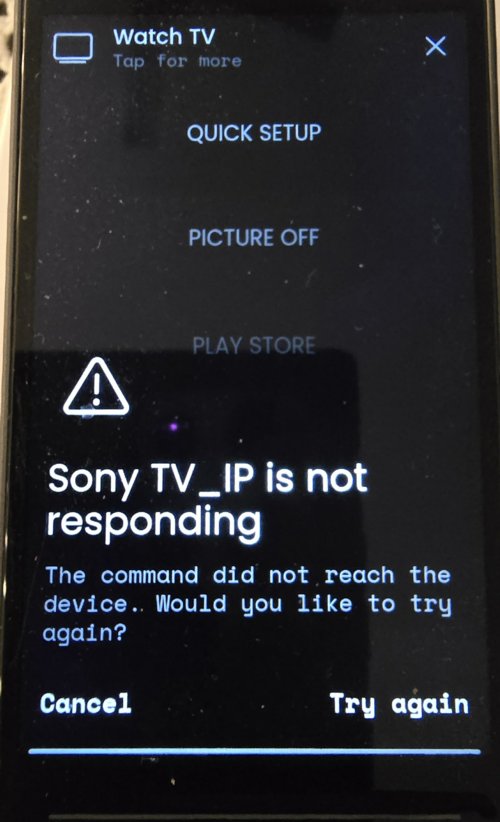
Did you just start the activity? If yes wait for next firmware a wait a couple of seconds before starting a activity. There is an indicator on top of display.
The resend feature seems to work only after activity is started.
Ralf
No the activity was already running. It works fine for a while but then for no reason at some point it does that. I hope the next firmware update will fix it cause the battery life is really the only thing that’s unacceptable. It should at least last a day. If the Sofabaton X2 had a mic I’d definitely give that one a try.
Mine lasted only about 10 hours. Really absurd!
My other remotes (SofaBaton) last over a week.
1 Like
Does your WiFi have multiple access points? Intermittent problems with integrations can have their reason in problems with disconnecting WiFi after a while…
I have a one-device MESH router.
It does, but I set the R3 to stay connected to wifi in sleep mode and also it has a fixed IP and is set to connect to the same access point every time.
Can you provide any advice to get a faulty dock serviced ? I have gone without response from support since December 8.
I have purchased a second dock for testing and it has resolved my discharging while docked issue.
Please advise.
I don’t know if I am lucky or you are unlucky but I got a response within a day.
Battery life is very poor. After full charge it last about 8-10 hours. I have reduced brightnes and other settings but only minimal effect.
1 Like
Got response today.
They’re sending a shipping label so they can check the dock.
I am new with the R3. So far everything is great, but I really have a problem with the battery. (with firmware 2.8.2)
I am using the Denon, Sky and Drembox integrations.
And I have only one AP.
If I disable “Keep WiFi connected in standby” the battery is good, but I have a delay when establishing the wifi…with a lot of complaints from my wife.
If I enable “Keep WiFi connected in standby” the WAF is great, but the battery is going down very fast. After around 12 hours the R3 is empty.
I did some wireshark-traces when “Keep Wifi connected in standby” is enabled.
If you look at this traces, you see NTP, DNS, a lot of packets to the docking-station and also some traffic to the other hifi devices. Is this really needed?
Wouldn´t it be possible, that you put the R3 in some kind of “hybrid-standby mode” where it only keeps the real needed wifi up&running.
In this “mode” it should reduce really all outgoing traffic and ignore all ip based incoming traffic. (no wakeups will happen).
Of course, if the sensitivity sensor of the R3 is activated it should immediately reactive all connections again, but because TCP is used, that should be possible very fast.
2 Likes
It looks like the remote isn’t going into sleep mode as in sleep mode there shouldn’t be any active connection to other devices. Maybe the remote is waking up by WoL packages? There is also a bug with keep WiFi connected where the remote wakes up by itself and activates the screen.
Disabling Bluetooth should also extend the battery life if you don’t need it.
if I enable: “Keep WiFi connected in standby”
How can I check, that the R3 is in sleep-mode?
Display-Timeout=30s
Sleep-Timeout=10s
Display goes off.
Ping is still working.
I noticed, that the display sometimes go on….
I am not using any WOL in the network.
Unfortunately I need Bluetooth for an Amazon-TV stick…
Disable active WiFi scanning for a test. This option was added for problematic WiFi mesh systems.
Ralf
You can check the log. There shouldn’t be any activity during standby.
I disabled the WIFI scanning.
What I am wondering:
When the device is in sleep-mode, should the ping work?
I can ping the R3 the whole time, even if the display is off for more than 5 minutes.
It seems, that I have two problems:
-
2026-01-18 14:05:08.772909 +00:00 core NOTICE Standby mode is inhibited by: [“Web configurator”]
but there is no WEB-Gui active in a Browser
2026-01-18 13:52:47.476684 +00:00 avahi-daemon INFO Withdrawing address record for 192.168.23.22 on wlan0.
2026-01-18 13:52:47.475183 +00:00 node-intg-dreambox_driver INFO Enter standby event: enable polling
2026-01-18 13:52:47.474371 +00:00 systemd-suspend INFO System returned from sleep state.
2026-01-18 13:52:47.170780 +00:00 intg-denonavr INFO ucapi.entities: [configured]: entity ‘media_player.AMP36170501118’ attributes updated
2026-01-18 13:52:47.827271 +00:00 systemd-resolved INFO Clock change detected. Flushing caches.
2026-01-18 13:52:47.822571 +00:00 intg-denonavr WARN denonavr.api: AVR error during trigger updates: Error sending command SSINFSIGPIX ?. Telnet connected: False, Connection healthy: False
2026-01-18 13:52:42.691695 +00:00 systemd-suspend INFO Entering sleep state ‘suspend’…
2026-01-18 13:52:42.569884 +00:00 systemd-logind NOTICE The system will suspend now!
2026-01-18 13:52:42.506134 +00:00 core NOTICE uccore : PWD=/opt/uc/data ; USER=root ; COMMAND=/usr/bin/systemctl suspend
2026-01-18 13:52:42.490838 +00:00 core NOTICE [BT] Scan mode: discoverable=false, connectable=false
2026-01-18 13:52:42.481156 +00:00 core NOTICE [UCD3-0C696C] on_session_disconnected: ClientDisconnect
2026-01-18 13:52:42.478382 +00:00 core NOTICE [BT] System suspend action: Sleep
Have you tried restarting the remote to reset all standby inhibitors? Also try clearing the browser cache of all browsers you accessed the web configurator.
From the 2nd log it looks like a command for the Denon integration (could be a sensor) triggered the wake up 5 seconds after it went to sleep.
I do the reboot everytime, when I change this parameters.
Right now the “Web configurator” does not happen again.
The "Denon” is strange: The Denon was power on but in standy. I simply activated it and the problem was solved..
After some minutes I put it again into standby and it seems that there is still a wakup:
2026-01-18 15:57:28.865935 +00:00 systemd-networkd INFO ip6_vti0: Unmanaging interface.
2026-01-18 15:57:28.865375 +00:00 systemd-networkd INFO lo: Unmanaging interface.
2026-01-18 15:57:28.863869 +00:00 systemd-networkd INFO ip_vti0: Unmanaging interface.
2026-01-18 15:57:28.862501 +00:00 avahi-daemon INFO Leaving mDNS multicast group on interface wlan0.IPv4 with address 192.168.23.22.
2026-01-18 15:57:28.860521 +00:00 avahi-daemon INFO Withdrawing address record for 192.168.23.22 on wlan0.
2026-01-18 15:57:28.858046 +00:00 systemd-resolved INFO Resetting learnt feature levels on all servers.
2026-01-18 15:57:28.853456 +00:00 systemd-resolved INFO Closing all remaining TCP connections.
2026-01-18 15:57:28.846559 +00:00 systemd-logind INFO Operation ‘sleep’ finished.
2026-01-18 15:57:28.820579 +00:00 systemd-suspend INFO System returned from sleep state.
2026-01-18 15:57:28.810736 +00:00 systemd-resolved INFO Clock change detected. Flushing caches.
2026-01-18 15:55:49.119523 +00:00 systemd-suspend INFO Entering sleep state ‘suspend’…
2026-01-18 15:55:48.990560 +00:00 systemd-logind NOTICE The system will suspend now!
That makes me crazy….