No. Make sure your ATV is switched on before you do this. Then refresh your browsers configurator tab, then when you select the input source command the ‘Source’ dialog box will have a drop down which is provided by your ATV. Select the source from there - in this case Netflix. You can’t just type it in.
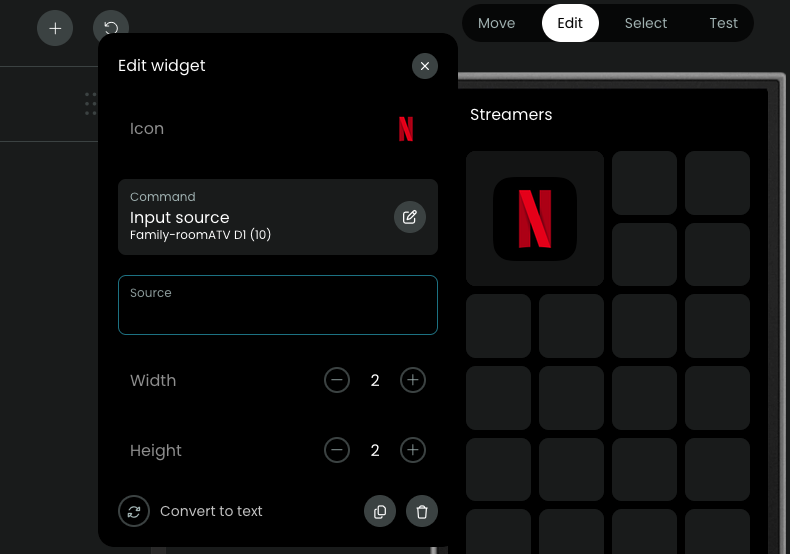
Try refreshing your browser
I did refresh the browser multiple times
OK I can only suggest coming out of the web configurator and going back in and trying again. Did you switch the ATV on using your R3? I just tried mine again and it worked as I described.
I will try going out and back in
No difference
Sorry - out of ideas then. I do know I had to reload the browser and go in to the UI mapping a few times before the source drop down appeared so I guess its a bit temperamental but it did work.
I appreciate your help
There are multiple reports that dropdowns are not appearing. This can have different reasons. First just try to enter the exact name (case sensitive) of the app. If this works it’s most likely a cache issue that others have also reported with other integrations.
If you get an error when executing the command the integration could maybe have not retrieved all app names and couldn’t find the app name in the internal integration source list. As a workaround you can try if the app has its own url scheme by either adding :// to the app name like appname:// oder use a real url if the app has one like https://appname.com.
Unfortunately this doesn’t work with all apps. Please post the integration logs in this case after you got the error. (settings/development/logs, choose Apple TV from servces).